Showing posts with label itunes drm removal. Show all posts

Aug 22, 2019

Backup and Export iTunes Library before It Disappeared


Apple is going to shut down iTunes, a useful media content management software, and use three separate apps to take the place of it. So, what about the the iTunes files you’ve bought or rented? It may not be gone, but who knows. Why not get them backed up for safe keeping or export iTunes library for enjoying at any time on any device. In this article, I will show you two ways to do it.

Part 1. How to Backup iTunes Library and Media Files

The first way to backup iTunes library is introduced by Apple Support, which is safe but complicated. Now I will give a quick step-by-step guide for you. You can also go to its official documents to get more details.

Step 1Consolidate iTunes library

Before making a backup, you need to consolidate your iTunes media files by going to the File > Library > Organize Library, and then click the OK button to close the popup.
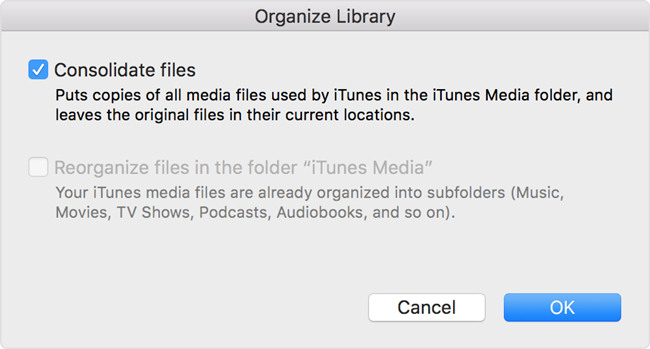
consolidate itunes library

Step 2Move iTunes library to external drive

Now quit iTunes app and find your iTunes folder where your media files exist. Usually, you can find it in the default location:
For Windows 7 or later: \Users\username\My Music\.
For Windows XP: \Documents and Settings\username\My Documents\My Music\.
For Mac: Open Finder windows and press Go > Home > Music > iTunes.
Then simply drag your iTunes folder from here to an external hard drive. Now your iTunes library and all media files are backed up to the drive. When you want to enjoy these media files again, you need to restore the library from the drive to the iTunes library.
Note: If you can't find your iTunes folder in the default location, you can go to the advanced settings and check its real location. To find it, just go to the Edit > Preferences > Advanced if you're a Windows user; if you're using a Mac, you can choose iTunes > Preferences > Advanced.

Part 2. How to Remove DRM and Export iTunes Library

As you see, the method above can help you backup iTunes library to the external hard disk, but it will not allow you to play them with other players expect iTunes. This is because all iTunes media contents are protected by Apple's digital right management (DRM) copyright. Thus here we'd like introduce some powerful DRM removal tools such as TunesKit DRM M4V Converter or TunesKit DRM Audio Converter, which allow you to get rid of the DRM encryption and then export all media content from iTunes to your computer in a common format such as MP4 or MP3, etc.
TunesKit M4V Converter is an all-in-one solution to help users losslessly remove DRM protection of iTunes movies and TV shows whether they're rented or purchased, so that users can watch them on many other common devices expect iDevices such as iPhone, iPad or Apple TV, etc.

TunesKit DRM Audio Converter is otherwise capable of removing DRM and converting all iTunes M4P songs and audiobooks to DRM-free formats like MP3, AAC, etc., without causing any quality damage, and then exporting them to any media device for playback with no limitation.

Steps to Backup and Export iTunes Movies and TV Shows with TunesKit M4V Converter

Step 1Launch TunesKit and add iTunes videos
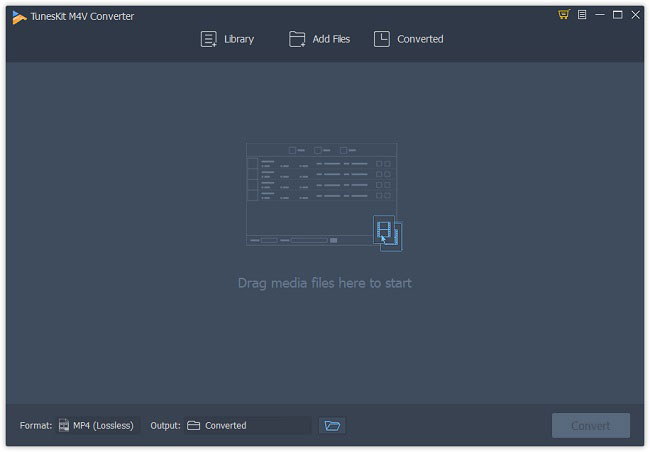
add itunes m4v videos
First, please download and install TunesKit DRM M4V Converter on your PC or Mac and then simply open it. After that, click the "Add Files" button to import the iTunes movies or TV episodes to the program or just drag the files to the program.

Step 2Set output format and parameters
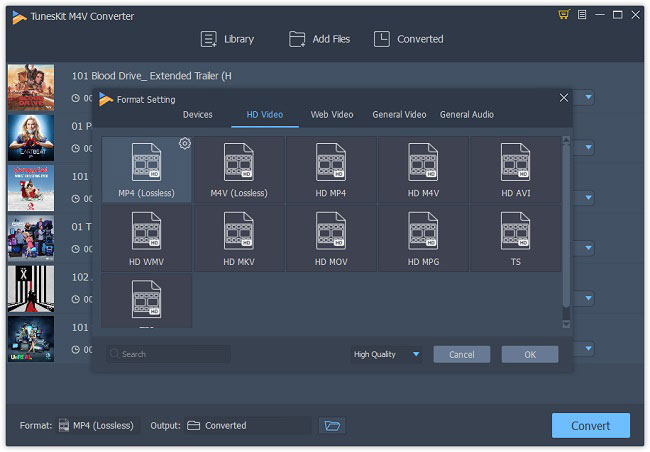
choose mp4 output format
Next click the Preferences option from the Menu icon on the top right corner and choose an output format such as Lossless MP4 or Lossless M4V. Change the other parameters like bit rate, codec after clicking the Gear icon when necessary.

Step 3Convert iTunes files and export them
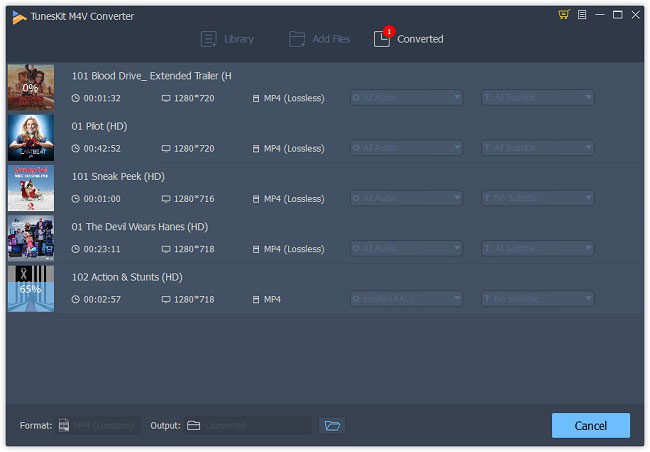
convert itunes m4v to mp4
Now click the "Convert" button to start the conversion. When it finished, all your iTunes movies and TV shows are saved and exported to the local folder of your computer.

Steps to Backup and Export iTunes Music and Audiobooks with TunesKit Audio Converter

Step 1Import iTunes M4P songs or audiobooks
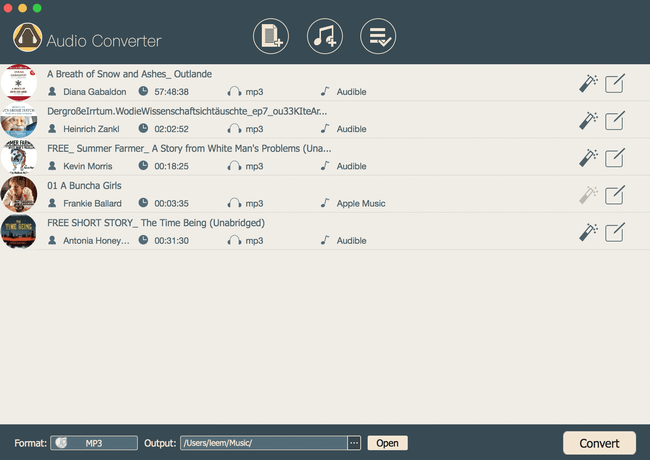
add apple music songs
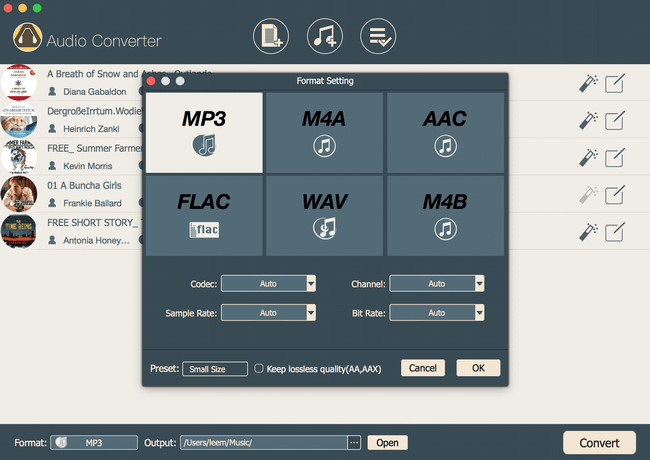
Click the iTunes icon on the top menu bar and add the iTunes music and audiobooks you want to back up, after completed the installation of TunesKit DRM Audio Converter.

Step 2Choose an output format

set mp3 output format
Now press the "Format" button and select an audio format for your iTunes audio files like MP3, FLAC, etc. You're also allowed to customize the channel, sample rate, etc. as you like.

Step 3Start conversion and save them

convert apple music to mp3

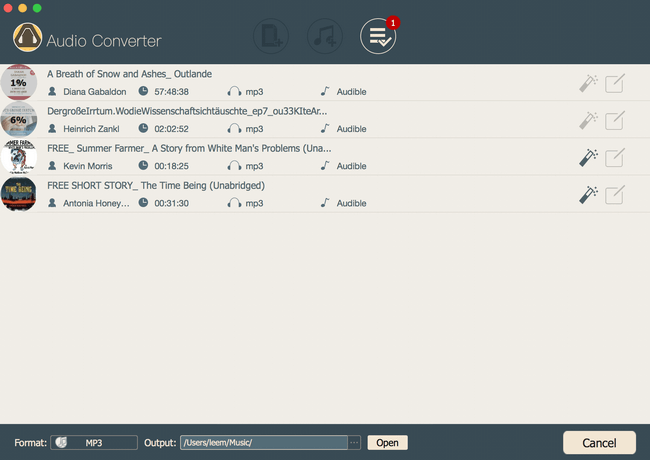
When all settings are ready, you can click the "Convert" button. Then the program will begin to remove the DRM and convert all iTunes audio files to DRM-free ones. You can find that all files are backed up and saved on your computer.

Source: https://www.tuneskit.com/reviews/export-itunes-library.html

Sep 19, 2017

TunesKit DRM Media Converter All Support iTunes 12.7 Perfectly

TunesKit, the top leader in DRM removal field, officially upgraded its featured DRM removal products for Mac, including DRM Media Converter, DRM Audio Converter, and Apple Music Converter by adding the perfect support to iTunes 12.7 on macOS 10.12 Sierra or lower. Till now, all TunesKit DRM media converter for Mac and Windows would work perfectly with the latest iTunes v.12.7 when removing DRM protection from iTunes M4V videos, Audible audiobooks, as well as Apple Music songs, etc.


Along with other new world-shocking products like iPhone 8, iPhone X, Apple TV 4K, Apple also launched the new version of iTunes 12.7 on the occasion of its tenth anniversary. Once it’s released, iTunes users can download the new upgrade for both Mac and Windows. However, TunesKit DRM removal product users, especially those using the Mac versions must have found that those tools can’t work as expected once the iTunes was upgraded to v.12.7. As a professional and customer-oriented iTunes DRM removal solution provider in the world, TunesKit R&D team began to seek for the fix as soon as the error occurred. Thanks to persistent hard work and continuous tests, they finally made a breakthrough on this issue and found the ultimate solution, making TunesKit the first developer that fixed the iTunes 12.7 incompatibility error in DRM removal area.

“Apple has strengthened its DRM encryption method with the release of iTunes 12.7. Therefore the old decrypting core used by TunesKit DRM removers can’t suppose to work any more.Fortunately, our programmers invented a new advanced DRM cracking technique completely different with the old one and it apparently turns out to working pretty well.” said Lee, TunesKit R&D director. “We also received some customers’ concern about converting the new 4K iTunes movie content with TunesKit. As a result, we’ll keep testing the program on our end and try our best to support those 4K movies in the near future.”

To sum up, no matter you are using the Mac or Windows version of TunesKit DRM media converting software, you can go ahead to upgrade your iTunes to 12.7 without worrying about the compatibility at all. However, Mac users should be well noted that the solution for iTunes 12.7 on macOS 10.13 High Sierra is still under development. Therefore those newly released TunesKit DRM removal products for Mac can only work well for iTunes 12.7 under macOS 10.12 or earlier.

To get the latest versions of the upgraded TunesKit Mac products, please either use the built-in auto upgrading or download the latest setup files from TunesKit Download Center.

Apr 21, 2017

TunesKit vs Noteburner vs Aimersoft: Which iTunes M4V Converter is Best

Are you fed up with the DRM (Digital Rights Management) on the iTunes movies you got? Feel annoyed that you can’t play the iTunes movies on your Android or other non-Apple devices? Don’t worry. With the iTunes movie DRM removal tools, you’ll solve this problem in seconds. Have you heard any useful tools such as TunesKit DRM Media Converter, NoteBurner M4V Converter Plus and Aimersoft DRM Media Converter? Nevertheless, here in this review, we’ll compare those three top-rated iTunes DRM video converters from different aspects, including conversion method, output quality, conversion time, speed, etc. in order to help you pick up the best iTunes M4V converter when removing DRM from iTunes videos.

TunesKit DRM Media Converter, NoteBurner M4V Converter Plus and Aimersoft DRM Media Converter are all contributed to convert the protected iTunes M4V videos to common unprotected file formats. When it comes to the effectiveness of these three tools, whose performance is the best? Just read on.

TunesKit VS NoteBurner VS Aimersoft: Converision Method


Aimersoft DRM Media Converter could be listed on the top priorities to bypass DRM from numerous types of copy-protected videos. But it is worth mentioning that Aimersoft DRM Media Cinverter can’t really remove the DRM protection and it gets the unprotected audios/videos by recording the original file. It is good news that TunesKit DRM Media Converter and NoteBurner M4V Converter Plus could convert DRM on iTunes movies and TV shows purchased and rented from iTunes store to DRM-free files.

TunesKit VS NoteBurner VS Aimersoft: Conversion Quality


The quality of conversion decides the comfort degree of enjoying videos. Here is where the difference between these three trial converters and the original file would be very apparent.


From these pictures, we can understand that the quality of TunesKit DRM Media Converter and NoteBurner M4V Converter Plus is the same as the original file, while we might be tiresome during the watching period by using the Aimersoft DRM Media Converter.

TunesKit VS NoteBurner VS Aimersoft: Conversion Process


When starting TunesKit DRM Media Converter and NoteBurner M4V Converter Plus, the iTunes will be launched by itself, which leads us to the files that we want to convert as quickly as possible by adding the files, dragging the files into the area. Besides, it is also supported to search the files into the area by NoteBurner M4V Converter Plus, whose ‘Convert’ button is not apparent. If it was your first time to use this app, you would get trouble in it. With the Aimersoft DRM Media Converter, the iTunes won’t show up until I click the button to convert videos. As a result, we must click the key words again and again to get the files that we need, which is very troublesome.

TunesKit VS NoteBurner VS Aimersoft: Conversion Time


When it comes to conversion time, TunesKit DRM Media Converter must be the solid choice. The reason is that I measured the processing time for all apps using the same roughly one-minute iTunes source movie, TunesKit DRM Media Converter just spends around 3 seconds finishing the task, NoteBurner M4V Converter Plus needs around half a minute but the Aimersoft DRM Media Converter needs more time, which is up to at least 4 minutes. Therefore, TunesKit DRM Media Converter is the fastest converter than the other two.

Conclusion: Which is the Best iTunes DRM M4V Converter?


From what have mentioned above, I could conclude that TunesKit DRM Media Converter, NoteBurner M4V Converter Plus and Aimersoft DRM Media Converter striping the restriction of DRM from iTunes movies and TV shows purchased and rental all aim to make our digital life easier and easier. But as far as I am concerned, TunesKit DRM Media Convertert and NoteBurner M4V Converter Plus are more convenient than Aimersoft DRM Media Converter as a whole. Nevertheless, which to choose between TunesKit DRM Media Converter and NoteBurner M4V Converter Plus depends on the following aspects.

If you have numerous iTunes movies in your library or you know the title of the movie you need to convert, NoteBurner M4V Converter Plus is a good choice because of the function of searching files. But according to the speed of converting videos with lossless quality, TunesKit DRM Media Converter may be the best choice. Hope this post can help you and now do you have the best iTunes M4V Converter to choose in your mind?

Jan 17, 2017

Requiem DRM Removal - How to Remove DRM from iTunes M4V with Requiem 4.1


You may heard of Requiem if you are looking for the best freeware to unlock DRM encryption from iTunes movies. Yes, we are discussing this special app here to help you understand it better in how it works in removing DRM from iTunes movies.

First of all, you should be aware of the fact that due to the copyright policy, Requiem lost the war with Apple after the release of iTunes 11. That's to say, if you want to use Requiem, you have to make sure you have iTunes 10.7 or lower. Otherwise it won't work any more.

The steps to remove DRM from iTunes media with Requiem is easy enough:

1. Download latest Requiem 4.1: Requiem 4.1 for Windows | Requiem 4.1 for Mac
2. Run Requiem: Double-click on the Requiem application to launch it on your computer. It will automatically find DRMed files in your iTunes library. You can also drag & drop files or directories (which will be searched recursively) onto the Requiem application or the Requiem window. Starting Requiem with the shift key down will disable scanning of the iTunes library.
3. Remove DRM: Then Requiem will remove the DRM of iTunes content automatically. The original DRMed files will be moved to the trash. Make sure you verify that the songs and videos still work before emptying the trash.

If you are however using most up-to-date iTunes now, don't worry. There are some alternatives to Requiem for iTunes DRM removal. One of the best replacements is TunesKit DRM M4V Converter. For more details about Requiem and its best replacement, please visit the source page here: Requiem 4 1 Download - Remove DRM from iTunes Movies

Dec 21, 2016

Ultimate Solution to Remove DRM from iTunes Movies, Audibooks, Music...


How would you describe Apple's ecosystem, especially the iTunes ecosystem? Doesn't it like that Apple has lured users into a trap using design or marketing, shut the door behind them and thrown away the key? Generally speaking, this kind of ecosystem lock-in essentially doesn't allow the customer to take the content and move to another platform. To be specifically, this can be achieved by limiting a device's file format compatibility, or by limiting the ways in which a device can be loaded with content.

Apple's Ecosystem Lock-in: iTunes Music, Video, and Books


Before January 6, 2009, audio files sold in iTunes Store were protected using Apple's own FairPlay DRM solution. As of today, all music sold in the iTunes Store after April 7, 2009, is DRM free while Apple put the DRM back to the songs in its newly released music streaming service, Apple Music. Currently, all video content, including movies, TV shows, and music videos sold through iTunes is DRM protected and can only be played on devices compatible with the FairPlay DRM. With iBooks, Apple offers both copy protected books as well as books without DRM on its iOS devices. In the case of audiobooks, they are generally offered in file formats, such as M4A or M4B, with embedded DRM protection.

Those facts portray a gloomy situation we have to face, that is, several types of content available for purchase in iTunes are subject to ecosystem lock-in, where we as users are prohibited from dealing with the purchased items in ways we like. That's not the end of the story, however. There are of course methods to strip DRM from iTunes media content, such as the ones introduced in the following article.

1. Free offline Apple Music or old iTunes M4P songs from DRM


If you are subscribing Apple Music streaming service or have a large collection of iTunes music files purchased before 2009, you may have the need to move away from Apple ecosystem by transferring those DRM-restricted songs to non-Apple platforms. In such a case, you are here to meet TunesKit DRM M4P Converter, a perfect DRM removal solution developed to completely remove DRM from offline Apple Music M4P songs, as well as the old iTunes music purchases protected by DRM. It's designed to free the M4P audio from DRM by converting the copy-protected songs to common MP3, AAC, M4A, FLAC, WAV, and M4B with original ID tags preserved. If you own any mac machine running OS X 10.8 or later, you should install the TunesKit M4P Converter for Mac.

For more details on how to crack DRM from Apple Music and iTunes M4P, you can follow this complete tutorial: How to Unlock DRM Copy Protection from Apple Music M4P Streams >>

2. Remove DRM from iTunes M4V movies, TV shows, music videos


As one of the largest online stores selling digital copies of movies and TV episodes worldwide, iTunes ecosystem, regardless of the DRM copy right, has made it convenient for customers to pick up any hot movie piece in minutes. In order to get the full control of the purchased or even rented movies from iTunes, you need to use a third-party iTunes DRM removal tool to decrypt the DRM. The magic M4V media converter we are talking about here is TunesKit DRM M4V Converter for Mac (Windows). It's an all-in-one DRM cracker that was designed to easily strip DRM protection from iTunes movies (rented and purchased), TV series, as well as music videos while converting the DRM-ed M4V videos to non-DRM MP4, M4V, MOV, AVI, MKV, MP3, AAC and other common media formats. It supports lossless conversion for the iTunes M4V movies to MP4 and M4V formats. That's to say, it will keep the original quality, including AC3 5.1 audio, subtitles, Closed Captions, AD, etc. so that you can enjoy the same lossless quality as the original movies even after the DRM is removed.

To see how to losslessly convert the DRM-ed iTunes movies to non-DRM M4V, please visit this source page: How to Losslessly Remove DRM from iTunes M4V >>

3. Break DRM lock from iBooks ePub files


Because of the DRM protection, the books sold from iBooks store, unlike the common ePub files, are only recognizable by Apple's devices. If you want to read the iBooks on other eBook readers, such as Amazon Kindle, or Nook, you'll have to firstly bypass the DRM protection from those ePub books with some useful iBooks DRM removal applications, such as TunesKit DRM iBook Copy for Mac, a powerful and smart DRM cracker for iBooks on Mac. It's able to remove DRM from eBooks with .epub and .ibooks extensions you purchased from iBooks or iTunes store. Once the DRM is unlocked from the books, you can freely convert the DRM-free iBooks to Mobi, AZW3, PDF or other popular eBook formats with Calibre eBook converter freeware.

You can find the complete guide on how to get DRM-free copies of iBooks ePub from this article: How to Remove DRM from iBooks >>

4. Convert DRM-ed iTunes M4B, M4A audiobooks


For iTunes users who have saved a large number of audiobooks with DRM, you can get rid of the DRM copy protection from the iTunes audiobooks with the help of TunesKit DRM Audiobook Converter (Mac). It's capable of removing DRM and converting the iTunes M4B, M4A audio books to unprotected MP3, AAC, M4B, M4A, WAV, FLAC formats for playback on any popular audio device. It will keep the chapter info for the audiobooks if you select the output format as M4A. Aside from converting the iTunes audiobooks to MP3 and other formats, this professional audiobook solution also supports Audible AA and AAX audiobooks.

Wondering how it performs in cracking DRM from the iTunes audiobooks, here you go: How to Convert iTunes M4B Audiobooks to MP3 >>

Source page: http://www.tuneskit.com/drm-basics/howto-remove-drm-from-itunes.html

Sep 1, 2016

TunesKit DRM M4V Converter was Upgraded to Support macOS 10.12 Sierra


TunesKit studio recently launched its updated DRM M4V Converter for Mac to fully support the latest macOS Sierra 10.12 beta. Now Mac users who are running the macOS Sierra could easily remove DRM from their iTunes M4V movies and TV episodes with the newest v.3.0.4 of TunesKit DRM M4V Converter for Mac.

TunesKit DRM M4V Converter is a powerful DRM removal solution for iTunes users developed to completely crack DRM lock from the protected iTunes M4V movies and TV shows while converting the M4V video files to common MP4, MOV, M4V, AVI, etc. with lossless quality preserved. Due to the advanced DRM removal core, TunesKit DRM M4V Converter is supposed to work faster than any other similar iTunes converters.

Now with the newly upgraded TunesKit DRM M4V Converter for Mac, users are able to convert the DRM-ed M4V videos to DRM-free videos on macOS 10.12 with the latest iTunes 12.5 smoothly. Besides, users who are running Mac OS X 10.11.6 or lower could also run TunesKit M4V Converter for DRM removal on iTunes movies.

About TunesKit

TunesKit is a professional multimedia software developer dedicated to providing the best DRM removal solutions and services, including iTunes DRM M4V Video Converter, DRM Audiobook Converter, Apple Music Converter, iBook DRM Copy for Mac and Windows platforms to customers for personal use throughout the world. Currently TunesKit already have millions of active users who are speaking highly of their DRM removal products.

Jul 20, 2016

TunesKit DRM M4V Converter for Mac Now Supports More Output Profiles


TunesKit Studio releases TunesKit DRM Converter for Mac 3.0.1, an important update to their popular DRM removal solution for OS X. Get full control over the media items you legally purchased from iTunes Store. With this new release, users can easily remove the DRM lock from iTunes videos while converting the protected M4V files to unprotected videos, including MP4, MOV, M4V, AVI, MKV, FLV, as well as MP3, M4A, AAC and other audio formats.

As the industry-leading DRM removal solutions provider, TunesKit Studio recently released a major update of its featured iTunes DRM Media Converter for Mac to v.3.0.1 with more impressive features introduced, including more output media formats, preset profiles of popular devices, re-designed new user interface, etc. Now with the newest version of TunesKit M4V Converter for Mac, users can easily remove DRM lock from iTunes rented and purchased videos while converting the encrypted M4V files to DRM-free MP4, M4V, MOV, AVI, FLV, MPG, and other common video and even audio formats with lossless quality.

Differs from the previous versions that can only convert DRM-ed iTunes movies to lossless DRM-free MP4, the latest release of TunesKit DRM M4V Converter for Mac v.3.0.1 adds full support to more popular output media formats, such as MP4, M4V, MOV, AVI, MKV, MPG, 3GP, FLV, SWF videos, as well as common audios, like MP3, AAC, M4A , etc. It still supports 1080P full HD iTunes movies conversion while keeping the original video quality, AC3 5.1 surround audio, closed captions for lossless MP4 and M4V output. Besides, it allows users to customize the output video and audio parameters, such as the bit rate, codec, size, channel, etc.

The updated TunesKit DRM Media Converter also adds multiple preset output profiles for popular mobile devices, including Apple iPhone 6S, iPhone 6, iPad, iPod, Apple TV, Samsung Galaxy, HTC One, PS4, Xbox 360, Google Nexus, Sony Xperia, and other Android phones or tablets. Thanks to those convenient ready-made profiles, TunesKit users could now transfer the iTunes M4V videos to any media playing devices for watching more easily.

The other big change of the new DRM Media Converter is the brand new user interface. In order to make it more clean and easy-to-use, TunesKit developers re-designed the interface with simpler layout, larger operation window and neat buttons. Any user can handle the software with ease, even for those who are not skillful to computers. It only takes a few clicks to get rid of DRM completely from a protected iTunes video file.

In addition to those major updates, TunesKit DRM Media Converter for Mac also fixed some minor bugs and optimized the product performance as well. Despite of the new benefits, some long existing great features, like the 30X faster conversion speed, and batch conversion are also retained in the new version. With all these stunning features, TunesKit iTunes DRM M4V Converter for Mac is expected to provide users a better DRM removal experience.

Till now, TunesKit DRM M4V Converter for Mac is fully compatible with the latest Mac OS X EI Capitan 10.11.6, 10.10, 10.9 and 10.8 with the latest iTunes v.12.4 installed. And it will get frequent updates to support every new upcoming release of Mac OS and iTunes version.

According to Andres, the product manager of TunesKit, similar update for their Windows version of DRM Media Converter is under progress now and will be launched very soon.


More about TunesKit DRM M4V Converter for Mac

TunesKit for Mac is one of the best iTunes DRM removal tools in the world specially designed to easily and completely remove FairPlay DRM encryption from purchased and rented iTunes movies, TV shows and music videos by converting the protected MPEG-4, well known as M4V, to unprotected media formats, such as MP4, M4V (non-DRM), MOV, AVI, FLV, SWF, MPG, 3GP, MP3, AAC, M4A, etc. with high quality. By adopting an advanced DRM decrypting technology, this smart iTunes DRM cracker is also able to keep the original AC3 5.1 surround audio, closed captions, and multilingual subtitles as you like. It could be the ultimate iTunes DRM removal solution that empowers you get away from FairPlay DRM lock and ever since get full control over the media items you legally purchased from iTunes store.

Jun 27, 2016

TunesKit DRM M4V Converter Got Update to Support Mac 10.11.6


In order to fully support the latest beta release of Mac OS X 10.11.6, TunesKit studio upgraded its featured DRM Media Converter for Mac to v.2.9.2. Mac users can now upgrade their TunesKit DRM M4V Converter for Mac to the latest version to remove DRM protection from iTunes M4V movies and TV shows on Mac OS X 10.11.6 beta.

Although the official release of Mac EI Capitan 10.11.6 is yet to come, many TunesKit users who have already upgraded to the 10.11.6 beta reported some problems in using TunesKit DRM M4V Converter to remove DRM from iTunes movies on the specific Mac OS X version. The common issue is that the output iTunes video files by TunesKit have no image or green screen with only audio tracks while playing back. In order to fix the problem, TunesKit R&D team keeps working and finally get the solution after repeatedly testing. Now with the newest v.2.9.2 of TunesKit DRM M4V Converter for Mac, users are able to easily and completely strip DRM off from iTunes movie rentals and purchases without problem as before.

Now all Mac users can get the most up-to-date version of TunesKit DRM Media Converter for Mac from the official website or using the built-in auto-upgrading feature within the program.

Official link: http://www.tuneskit.com/tuneskit-for-mac.html

More About TunesKit DRM M4V Converter for Mac


TunesKit DRM M4V Converter for Mac is an all-in-one iTunes DRM removal solution for Mac users that is developed to crack DRM lock from iTunes videos, including the protected music videos, movie rentals and purchases, and TV episodes. While bypassing the DRM restriction from the M4V files, this smart DRM remover is also able to convert the protected M4V videos to common MP4 format with 100% original quality preserved. That’s to say, it can keep the original AAC stereo audio, AC3 5.1 Dolby sound, subtitles, closed captions, etc. in the output DRM-free video files. It works at 20x faster speed due to the advanced and innovative DRM decryption method. Once the DRM is successfully cracked from the iTunes media, customers won’t be restricted by the limit any more so that they can enjoy any iTunes movie on non-Apple devices as they like.

How to Remove DRM from iTunes M4V on Mac 10.11.6 with TunesKit


It only takes a few steps to completely bypass DRM control from iTunes movies or episodes by using TunesKit DRM Media Converter.
Install TunesKit v.2.9.2 on Mac OS X 10.11.6 or lower.
Launch TunesKit and add the iTunes M4V videos by clicking “Add Files” button.
Click “Convert” button to start to remove DRM from iTunes files.

Jan 8, 2015

How to Easily Bypass DRM Lock from iTunes TV Shows


Ever since 2005, iTunes began to offer purchasing service of TV shows with $1.99 in SD and $2.99 in HD for individual episode. Later on, iTunes added the ability to buy a season pass for television shows. For years, people have been used to buying TV shows from iTunes for watching despite the fact that they are being restricted by the DRM on the TV shows at meantime.

Just like any other movies sold from iTunes, TV shows are also protected by Apple’s DRM lock which prevents people from directly transferring the episodes to non-Apple-approved devices for playback. Therefore, removing DRM protection from iTunes TV episodes becomes fairly urgent. The good news is, the DRM protection encrypted on iTunes TV series can be easily stripped off with the help of some professional iTunes DRM removal software, such as, TunesKit iTunes DRM Video Converter for Mac.

Developed by TunesKit Studio, a top-leading multimedia software provider, this iTunes DRM remover aims to remove DRM lock from protected TV shows and movies in 3 steps only. It can not only bypass DRM restriction from iTunes TV series, but also convert the DRM-ed iTunes TV files to non-DRM-protected MP4 format with fast speed and lossless quality. Now follow the tutorial below to begin removing DRM protection from iTunes TV shows on Mac.

Requirements to Remove iTunes TV Shows DRM with TunesKit

1.    Download and install the latest version of TunesKit iTunes DRM Video Converter for Mac on your computer;

2.    Make sure you are running Mac OS X 10.8 or later, otherwise the program won’t work properly;

3.    Confirm the iTunes has been upgraded to the latest version in order to use TunesKit DRM Cracker for Mac.

Step-by-Step: Bypass DRM Protection from iTunes TV Episodes on Mac

Step 1. Add Protected iTunes TV Series

After launch TunesKit iTunes Video Converter, click “Add Files” button on the program or drag the files to import the TV shows from iTunes library to the converter.

Step 2. Choose Output Folder & Audio Tracks

Click “Output Folder” button and “Settings” icon to set the output path and audio tracks before removing DRM from iTunes TV shows.

Step 3. Start to Remove DRM from iTunes TV Shows

When all settings are OK, you can begin to remove DRM protection from iTunes TV episodes by clicking “Convert” button.


Once the conversion finished, you can find the target DRM-free iTunes TV shows and import them to any devices you like for free watching.

Dec 30, 2014

Best Tool to Remove DRM Lock from iTunes Movies & Episodes


When you find it’s impossible to transfer a purchased movie to certain devices, or you are hardly to edit a paid video or audio, you are probably restricted by Digital Rights Managements, which is commonly known as DRM.

Generally speaking, DRM is a technology adopted by digital media sellers to control the way customers using those files after sale. Among them, the most popular one is called FairPlay DRM which used on iTunes movies and TV shows by Apple to prevent users from copying and transferring those media files to non-Apple devices even after they legally purchased the movies.

So in order to get the full ownership of those iTunes purchases, people are looking for an effective way to remove DRM from iTunes movies and TV shows. Although there are various tools developed to strip iTunes DRM, only few of them could perform as great as advertised in removing DRM protection from iTunes videos.

In this article, we are going to introduce you the best DRM removal tool to get rid of DRM from both iTunes movie purchases and rentals with ease, while showing you how to use this tool to remove DRM from protected iTunes movies step by step.

Best iTunes DRM Removal Tools for Mac & Windows

The magic iTunes DRM remover is called TunesKit iTunes DRM VideoConverter for Mac which can not only remove DRM protection from iTunes movie rentals and purchases, but also convert the protected iTunes movies and TV episodes to unprotected MP4 format with lossless video quality and original Dolby 5.1 AC3 audio tracks and subtitles. Unlike other similar programs, this DRM tool is the fastest iTunes video converter to convert DRM-ed iTunes videos at 20x faster speed. To remove iTunes DRM on Windows OS, you are suggested to use TunesKit iTunes DRM Remover for Windows.

Now, we will take TunesKit iTunes DRM Remover for Mac as an example to guide you on DRM removal for iTunes movies and TV shows on Mac OS X.

Please note, this iTunes DRM Video Converter for Mac only works on Mac OS X 10.8 or later with the latest iTunes version installed.

Strip DRM Off iTunes Movies/Episodes with TunesKit iTunes DRM Remover

1. Import protected iTunes movies and TV shows to TunesKit. You can add the DRM-ed iTunes video files to the program either by clicking “Add Files” button or by directly dragging and dropping the movies.

2. Customize output settings. It allows you to choose the output path and output audio tracks and subtitles before removing the DRM. You can adjust the parameters by clicking “Settings” icon listed in the program.

3. Start to remove DRM and convert iTunes movies. Once all the settings are done, you are supposed to begin removing DRM from iTunes movies and converting the video files to DRM-free MP4 by clicking on “Convert” button.

More Tips for DRM Removal
  • If you don’t require much for the conversion speed and output quality, you can turn to some free iTunes DRM removal tools, such as Requiem to strip DRM off iTunes movies and TV series
  • If you are looking for the best DRM removal tools to remove DRM protection from other resources other than iTunes, you can refer to these bestDRM remover for Mac & Windows to get some hints.

Dec 25, 2014

Remove DRM Protection from iTunes 12 with TunesKit iTunes DRM Remover


As the top-leading software developer, TunesKit studio recently made the statement that its iTunes Video Converter is expected to work fine with the latest iTunes 12 on Mac OS X 10.10 Yosemite or Windows OS.

Although it has been a while after the iTunes 12 was made available for upgrading, many existing TunesKit users are still hesitated for the installation of iTunes 12 since they are not sure whether the current version of TunesKit iTunes DRM Remover for Mac and TunesKit iTunes DRM Remover for Windows supports iTunes 12 or not. 

Actually back to July when the iTunes 12 beta was firstly introduced to the world. TunesKit studio has began the testing on removing DRM from protected movies on the beta version of iTunes 12. After repeated hard work, the TunesKit iTunes DRM Video Converter has been proved to be fully compatible with iTunes 12 on Mac OS X and Windows computers. That's to say, with the current iTunes DRM Remover, iTunes customers are able to easily remove DRM protection from iTunes 12.

This program was made easy enough for any user to operate. It will take only 3 steps to get rid of DRM restriction from iTunes movies and TV shows on iTunes 12  by using TunesKit iTunes DRM Video Converter. Now you may follow the instruction below to see how it performs.

Once the application is launched, users can add the movies from iTunes library by clicking "Add Files" button or by directly dragging and dropping. Then it requires you to select output folder, audio tracks and subtitles. After that, the conversion could be activated by clicking "Convert" button. It will do the rest work automatically for you.

For more details, please visit the official website of TunesKit: http://www.tuneskit.com

More About TunesKit iTunes DRM Video Converter


TunesKit iTunes DRM Video Converter is a professional iTunes DRM removal tool to help iTunes users convert iTunes DRM'd movies and TV shows to unprotected MP4 format while stripping the DRM off the movies. It's currently the fastest iTunes Video Converter which works at 20x faster speed to remove DRM protection while preserving the original video quality of the movies.

How to Remove DRM from iTunes Rentals without Quality Loss


Many of you may need to remove DRM protection from iTunes movie rentals for different reasons, for example:

1.    Movies rented from iTunes are locked by FairPlay DRM so that you can’t directly stream them to non-Apple devices for playback;
2.    iTunes movie rentals come with a solid period of validity which allows you to keep the movies for 30 days only and forces you to finish watching the rentals within 24 hours once you started to watch it.

In fact, there are various ways to crack the DRM from iTunes rentals thus to make them to be playable on any digital media players. However, one thing to note is that not all of them can preserve the original video quality of the iTunes rented movies after removing the DRM. To be honest, only few of them can remove the DRM with lossless quality preserved. Here in this article, we will introduce one of the best iTunes DRM removal software to help you bypass DRM protection from rented iTunes movies losslessly on Mac.

This magic iTunes DRM remover is called TunesKit DRM Video Converter for Mac. It’s a smart yet powerful DRM removal tool for iTunes rentals to remove FairPlay DRM from iTunes movie rentals as well as convert the protected iTunes rented movies to non-protected MP4 format with 100% original HD video quality retained. In addition to lossless video quality, this professional iTunes DRM video converter can also keep the Dolby 5.1 surround audio tracks and subtitles while removing DRM from iTunes rented movie files.

Now you may follow the steps to begin losslessly removing DRM from iTunes movie rentals and converting the rented videos to DRM-free MP4 on Mac OS X 10.8 or later.

Tutorial: Convert DRM iTunes Rentals to MP4 with Lossless Quality

Step 1. Load Rented iTunes Movies from Library

You can either add the iTunes rentals by clicking “Add Files” button in the program or by directly dragging & dropping the iTunes rented movie files to the program.

Step 2. Customize Output Audio Tracks & Subtitles

Click “settings” icon listed behind the movie name to choose the audio tracks and subtitles for the output iTunes movie rentals.

Step 3. Start to Remove DRM from iTunes Rentals Losslessly

Once all the settings are done, you can click “Convert” button to begin removing DRM from iTunes rented videos and converting the DRM-ed M4V rentals to MP4 with original quality kept.


After the DRM removal process, you can find the lossless DRM-free iTunes rentals and transfer them into any non-Apple devices for watching as you like.

Dec 22, 2014

Why Should We Remove DRM from iTunes Movies & TV Shows


When talking about DRM (Digital Rights Management), most of us may think of iTunes movies and TV shows, for they are all protected by Apple’s FairPlay DRM which has largely restricted our full ownership in using the video files even after we legally purchased or rented them from iTunes Store. Here in the following article, we will list top 3 restrictions brought by iTunes movies so as to prove why it’s necessary for us to remove DRM from iTunes movie rentals and purchases while providing you a simple solution to legally get DRM removed from rented and purchased iTunes movies or TV shows.

 Note: If you are not yet familiar with the DRM protection of iTunes movies, you may figure it out from: What is FairPlay DRM& How to Remove FairPlay DRM Protection from iTunes Movies.

1. All Movies on iTunes are Restricted to Play on Apple’s Devices Only

To prevent iTunes customers from copying movies and TV shows from iTunes to other non-Apple-approved devices after buying, Apple adopted the FairPlay DRM protection to encrypt the videos, including rented and purchased movies, TV shows and music videos on iTunes Store. Due to that DRM protection, all iTunes movies are saved in M4V video format which is only recognizable by Apple’s devices or media players only.

In this case, Android or Windows Phone users and any other non-Apple users would be impossible to watch iTunes movies or TV episodes even if they made the legal purchase of the videos. So the unfair playback restriction is the most important cause to force us to get rid of DRM from iTunes movies for good.


2. All iTunes Videos are Prohibited from Sharing and Editing

Apart from the playback restriction caused by iTunes DRM protection, another main reason why we need to remove the DRM is that we are not allowed to share iTunes movies to any platforms beyond Apple’s approval. Because of the DRM copy protection, we can’t edit the purchased iTunes video files even on Apple’s own video editing software like iMovie or Final Cut Pro. We can’t transfer iTunes movie purchases from one account to the other. Undoubtedly, DRM restriction on iTunes movies has made it difficult for us to enjoy the fun of iTunes movies.


3. Rented iTunes Movies are Set to be Expired within 24 or 48 Hours

Restriction caused by DRM becomes tougher for iTunes movie rentals. Except for the ones mentioned above, the unique restriction applied on iTunes movie rentals is that all rented movies and TV shows are only valid for keeping in 30 days while valid for watching within only 24 hours in US and 48 hours in other countries once started. That’s to say, the rentals will disappear from iTunes library once it’s expired and we have to rent it again if we want to continue watching.


Remove DRM Restriction from iTunes Movie Rentals and Purchases

It’s quite clear that the iTunes DRM protection is controlling and restricting us in every aspect of what we can do with the movies we legally purchased or rented from iTunes. Thus it’s an urgent task for us to remove DRM restriction from iTunes videos once and for all. Here we are going to introduce TunesKit iTunes DRM Remover, a professional 3rd-party iTunes DRM removal application for Mac and Windows to help you bypass DRM protection from iTunes movie rentals and purchases with ease.

It’s the smartest integrated iTunes DRM removal tool and video converter which can easily remove DRM from both rented and purchased iTunes movies and TV shows by converting the DRM-ed iTunes M4V videos to unprotected MP4 format with 100% original video quality (even 1080P), 5.1 Dolby surround audio and multi-language subtitles kept.

Dec 4, 2014

What You Need to Know When Removing DRM from iTunes Movies


We always want to remove DRM protection from iTunes movies and TV shows for they are prohibited from sharing and editing while restricted to be played on Apple’s devices only. However, it’s not as simple as it sounds to be when we remove DRM from the protected iTunes movies. In order to make the iTunes DRM removal more smooth and successful, we need to pay attention to some essential rules before removing the DRM lock from iTunes videos.

1.   Is It Legally to Remove DRM from iTunes Movies & TV Shows?

This remains to be a controversial topic for a long time. Although the DRM is declared to protect the rights of copyrighters, but actually it infringes customers’ rights in enjoying something they legally purchased. So it’s hard to tell which is legal or illegal. But since the purpose of iTunes DRM is to prevent the abuse of iTunes content by others, we would like to see it’s acceptable and legal if the intention to remove iTunes DRM is for gaining the right of full ownership over the movies, instead of for sharing or redistributing it again.

2.   What Tools You Need for iTunes DRM Removal?

Once you’ve made up your mind to remove DRM from iTunes movies for personal use, the next step is to focus on the tools which you should use to remove DRM protection from iTunes movies. As you may see, there are actually a lot of similar iTunes DRM removal software clarifying to get rid of DRM securely and permanently. However, you should keep in mind that not all of them will work as advertised. Based on hands-on experience, you are suggested to try the DRM remover firstly to make sure it works fine for you. In this case, some tools like TunesKit iTunes DRM Remover for Mac, TunesKit iTunes Video Converter for Windows, Aimersoft DRM Media Converter are worthy a try. If you are expecting an incredible fast speed and amazing high quality, TunesKit would definitely give you surprise.

3.   Requirements to Remove DRM Protection from iTunes Videos?

A professional iTunes DRM converter even like TunesKit, however, is not quite enough to guarantee a successful iTunes DRM removal. It requires additional conditions to avoid any unnecessary problem from occurring during the DRM removing process. And here we are talking about your iTunes movies, TV shows and the computer system.

Typically, to successfully remove DRM from an iTunes movie, it requires the movie file to be played normally on iTunes. Almost all iTunes DRM video converter won’t work for those iTunes movies which are expired. So you need to confirm that all of your iTunes movies and episodes your are going to remove DRM protection from, especially the rented ones, are playable on iTunes before the DRM removal process.


Last but not least, just as different iTunes DRM removers require different computer compatibilities, you'd better check the system requirements of the iTunes DRM video converter ever before installing it on your computer to make sure your computer operating system supports the program. For example, TunesKit iTunes DRM M4V Converter for Mac is only workable on Mac OS X 10.8 or later. So if you are running the OS X below 10.8, you should either upgrade your OS to the required version or change to another iTunes DRM remover.

Dec 1, 2014

Guide to Remove FairPlay DRM from iTunes M4V Movie Rentals & Purchases


Brief Introduction of FairPlay DRM Copy Protection

FairPlay, a digital rights management (DRM) technology created by Apple, is specially adopted to encode movies, TV shows and music videos sold in its iTunes Store. The majority of FairPlay-encrypted files, commonly known as M4V format, are regular MP4 container files with an encrypted AAC audio stream. Due to FairPlay DRM protection, all video files purchased or rented from iTunes are restricted to be played on iTunes compatible software or devices only. And for the iTunes movie rentals, users only get 30 days to watch the movies and 24 hours or 48 hours to finish watching once started.

Is It Possible to Bypass FairPlay DRM from iTunes Video?

Because of the unfair rules, FairPlay DRM encryption has been opposed by most iTunes customers ever since the implement. Since the trend to remove FairPlay DRM from iTunes movies is growing day by day, something called FairPlay DRM removal software came out to meet the requirements. Here in this article, we would like to introduce you one of the best iTunes FairPlay DRM remover to bypass FairPlay DRM protection from iTunes M4V movie rentals and purchases legally.

Best FairPlay DRM Removal Tools

Among the numerous iTunes FairPlay DRM removal tools, the best and fastest one is TunesKit iTunes FairPlay DRM Cracker which is dedicated to strip DRM protection off rented and purchased iTunes movies, TV shows and music videos with 20x faster speed. It’s able to losslessly convert the protected iTunes M4V videos to DRM-free MP4 format while removing the FairPlay DRM from the movies. What’s more, it can keep the 100% original Dolby AC3 5.1 audio, subtitles and video quality after conversion. Once converted, you are able to enjoy the non-FairPlay-DRM locked iTunes movies and TV episodes on any portable devices like Samsung, HTC, LG, Nokia, BlackBerry, PPS, etc.

How to Get Rid of FairPlay DRM Protection from iTunes M4V Videos

Here let’s take TunesKit iTunes DRM Removal for Mac for example to see how to bypass DRM copy protection from iTunes M4V movies and TV shows on Mac with 3 steps only. Windows users can refer to TunesKit iTunes DRM Remover for Windows for the FairPlay DRM removal.

Step 1. After launch TunesKit FairPlay DRM Converter for Mac, click “Add Files” button to select the iTunes M4V movies you want to convert. Then click “OK” to load the files. Or you can also import the iTunes videos by directly dragging and dropping the M4V files into the program.

Step 2. Click the “settings” icon in the program to customize the output audio tracks, subtitles by yourself. Otherwise it will keep all the 5.1 surround audio tracks, stereo audio tracks and subtitles automatically.

Step 3.  Once all the M4V movies are added, you can start to remove the FairPlay DRM and convert the iTunes files to MP4 format by clicking “Convert” button.


After conversion, you can find the non-DRM iTunes videos in the output folder and put them onto any mobile devices to enjoy.

You can also use TunesKit for Windows to remove DRM from iTunes movies on Windows platform.

Nov 30, 2014

iTunes DRM Remover Reviews – Best DRM Removal Software for Mac and Windows


Admit it or not, DRM has made it impossible for us to freely enjoy movies and songs in our daily lives. Therefore, many people are seeking for the best solutions to bypass the DRM protection once and for all. In order to save your time and help you choose the best DRM removal tool from various similar programs, we are here introducing you the top 3 DRM media converter that are able to remove DRM restriction from iTunes, Amazon, WMC, BBC, etc on Mac and Windows systems.

Now let’s simply get started from what DRM is and why we need to remove DRM for good.

What’s DRM Protection

DRM, known as Digital Rights Management, is an anti-piracy technology adopted by digital copyright owners to restrict the use of their digital materials by others. The purpose of DRM is to prevent people from duplicating and sharing copyrighted movies, music, software, etc to any other platforms the owners don’t like them to. 

Why We Need to Remove DRM

Apparently, DRM has largely restricted our freedom in enjoying digital content. Therefore, it’s urgent to get rid of the DRM and gain the full ownership of media files we legally purchased. We’ve put together the main reasons why we need to remove DRM as below:
  •   We are restricted to use purchased media contents only on certain devices;
  •   We are not allowed to edit video or audio even we have paid for it;
  •  We are controlled by sellers over every aspect of what to do with the media;
  •  We may lose what we have paid for if the sellers stop running the media files.


Top 3 DRM Removal Tools – Remove DRM from iTunes, Amazon, WMC

The following article is going to list you the top 3 best DRM decryption software for Mac and Windows to crack DRM lock from iTunes, Windows Media Center, Amazon, Xbox Live Store, etc. So if you need to unlock the DRM restriction from protected media files, you can simply refer to the recommendations below to pick the one you like to remove the DRM and convert the DRM-ed video or audio files to any plain format thus to enjoy them on multiple portable devices, such as Android phones and tablets, Windows Phone and others.

1.     TunesKit iTunes DRM VideoConverter (Mac & Windows) - $44.95

Being the fastest and smarted iTunes DRM remover in the world, TunesKit DRM Video Converter is able to strip DRM protection from both iTunes M4V movie rentals and purchases at 20x faster speed. Besides, it’s able to convert the DRM protected M4V to MP4 format with 100% original video quality, 5.1 surround sound and subtitles kept. With TunesKit FairPlay DRM Video Converter, you are able to enjoy rented or purchased iTunes movies and TV shows on almost all media playing devices, such as Samsung Galaxy, HTC One, Amazon Kindle, Nokia, and so on.

2.     Aimersoft DRM Media Converter (Windows) - $ 35.95

Aimersoft DRM Media Converter for Windows is the most versatile DRM removal software to convert any file format with DRM protection. With this Windows DRM media converter, you can say goodbye to all the frustrations that you had encountered with DRM protected media files, including the video and audio files downloaded from sites such as iTunes, Amazon, BBC, Nokia Music store, etc. Besides, you can convert almost all DRM-ed videos and audios, like M4V, WMV, ASF, AA, M4A, M4B, M4P, M4R to DRM-free MP4, MOV, AVI, WAV, MP3, MPEG, etc by using this magic DRM remover tool for Windows.

3.      ePubor eBook DRM Removal (Mac & Windows) - $ 45.99

ePubor eBook DRM Converter is an all-purpose eBook DRM Removal and eBook Converter software for both Mac and Windows users. It can remove DRM protection from all eBook sold by any retailers, including Amazon Kindle, Sony, Barnes & Noble, KOBO, etc. It also performs as an eBook Converter to convert eBooks between a wide range of eBook formats and for all popular eBook reader devices or software.

Extended Reading – Different DRM Technologies You Should Know

Apple’s FairPlay DRM Copyright Protection for iTunes

There are different kinds of DRM technologies actually. Among them, the most famous one is Apple’s FairPlay. It is originally created by Apple and mainly used to encrypt iTunes contents, including movies, TV shows, music videos, apps, ebooks, etc thus to prevent anyone from playing the media files on non-Apple devices. Worse still, due to FairPlay DRM, users who rent movies from iTunes Store only get one month to watch the films and 24 hours (in US) or 48 hours (in other countries) to finish watching it once started.

DRM Protection from Windows Media Center, Amazon

Like FairPlay used by Apple, Amazon and Microsoft also adopt DRM technology to encrypt media files sold from its online digital store. We are not allowed to transfer or play media files, including WMA, WMV, AA, etc purchased from Amazon Instant Video or Windows Media Center.

CSS DRM Encryption on DVD Discs


DRM protection added to DVDs may be the earliest DRM system introduced by content providers. It was named Content Scrambling System (CSS). The CSS encryption still exists now in many DVDs. It encrypts the DVD disc and protects it from copying. Manufacturers of DVD players must be authorized by the DRM content provider to play their DVD content. More DRM encryption like DeCSS, AACS, RCE are developed later to encrypt DVD Films.