Showing posts with label remove itunes drm. Show all posts

Aug 22, 2019

Backup and Export iTunes Library before It Disappeared


Apple is going to shut down iTunes, a useful media content management software, and use three separate apps to take the place of it. So, what about the the iTunes files you’ve bought or rented? It may not be gone, but who knows. Why not get them backed up for safe keeping or export iTunes library for enjoying at any time on any device. In this article, I will show you two ways to do it.

Part 1. How to Backup iTunes Library and Media Files

The first way to backup iTunes library is introduced by Apple Support, which is safe but complicated. Now I will give a quick step-by-step guide for you. You can also go to its official documents to get more details.

Step 1Consolidate iTunes library

Before making a backup, you need to consolidate your iTunes media files by going to the File > Library > Organize Library, and then click the OK button to close the popup.
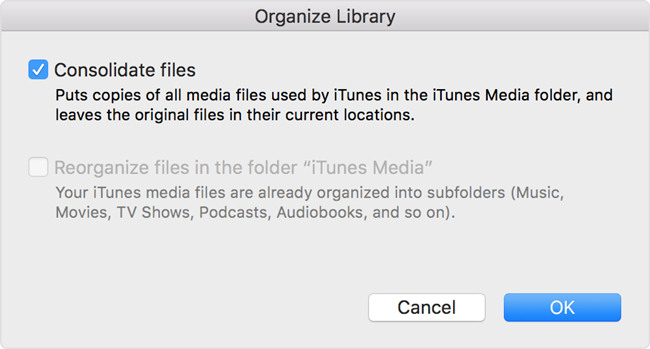
consolidate itunes library

Step 2Move iTunes library to external drive

Now quit iTunes app and find your iTunes folder where your media files exist. Usually, you can find it in the default location:
For Windows 7 or later: \Users\username\My Music\.
For Windows XP: \Documents and Settings\username\My Documents\My Music\.
For Mac: Open Finder windows and press Go > Home > Music > iTunes.
Then simply drag your iTunes folder from here to an external hard drive. Now your iTunes library and all media files are backed up to the drive. When you want to enjoy these media files again, you need to restore the library from the drive to the iTunes library.
Note: If you can't find your iTunes folder in the default location, you can go to the advanced settings and check its real location. To find it, just go to the Edit > Preferences > Advanced if you're a Windows user; if you're using a Mac, you can choose iTunes > Preferences > Advanced.

Part 2. How to Remove DRM and Export iTunes Library

As you see, the method above can help you backup iTunes library to the external hard disk, but it will not allow you to play them with other players expect iTunes. This is because all iTunes media contents are protected by Apple's digital right management (DRM) copyright. Thus here we'd like introduce some powerful DRM removal tools such as TunesKit DRM M4V Converter or TunesKit DRM Audio Converter, which allow you to get rid of the DRM encryption and then export all media content from iTunes to your computer in a common format such as MP4 or MP3, etc.
TunesKit M4V Converter is an all-in-one solution to help users losslessly remove DRM protection of iTunes movies and TV shows whether they're rented or purchased, so that users can watch them on many other common devices expect iDevices such as iPhone, iPad or Apple TV, etc.

TunesKit DRM Audio Converter is otherwise capable of removing DRM and converting all iTunes M4P songs and audiobooks to DRM-free formats like MP3, AAC, etc., without causing any quality damage, and then exporting them to any media device for playback with no limitation.

Steps to Backup and Export iTunes Movies and TV Shows with TunesKit M4V Converter

Step 1Launch TunesKit and add iTunes videos
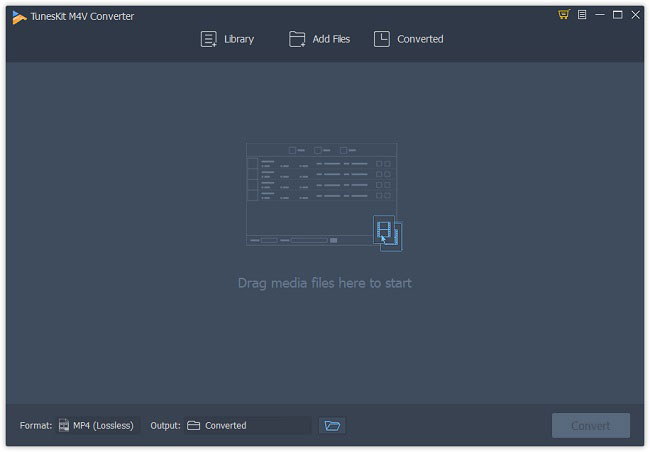
add itunes m4v videos
First, please download and install TunesKit DRM M4V Converter on your PC or Mac and then simply open it. After that, click the "Add Files" button to import the iTunes movies or TV episodes to the program or just drag the files to the program.

Step 2Set output format and parameters
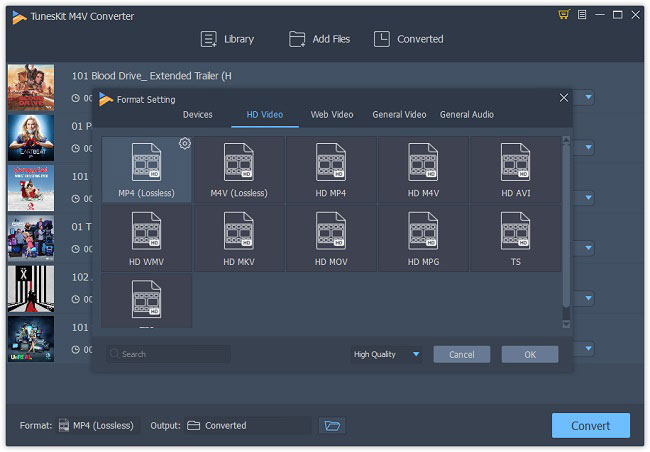
choose mp4 output format
Next click the Preferences option from the Menu icon on the top right corner and choose an output format such as Lossless MP4 or Lossless M4V. Change the other parameters like bit rate, codec after clicking the Gear icon when necessary.

Step 3Convert iTunes files and export them
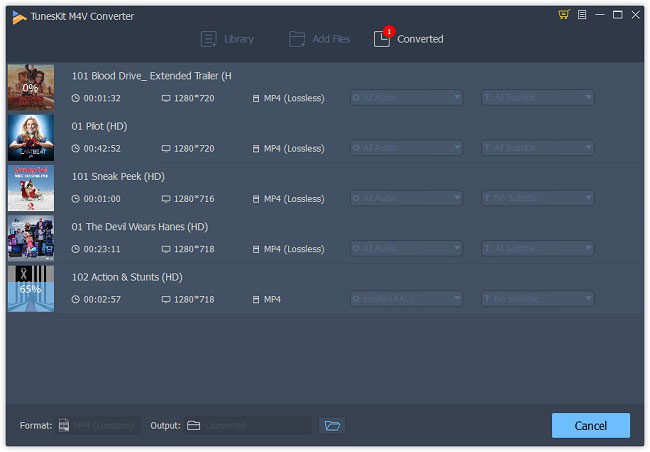
convert itunes m4v to mp4
Now click the "Convert" button to start the conversion. When it finished, all your iTunes movies and TV shows are saved and exported to the local folder of your computer.

Steps to Backup and Export iTunes Music and Audiobooks with TunesKit Audio Converter

Step 1Import iTunes M4P songs or audiobooks
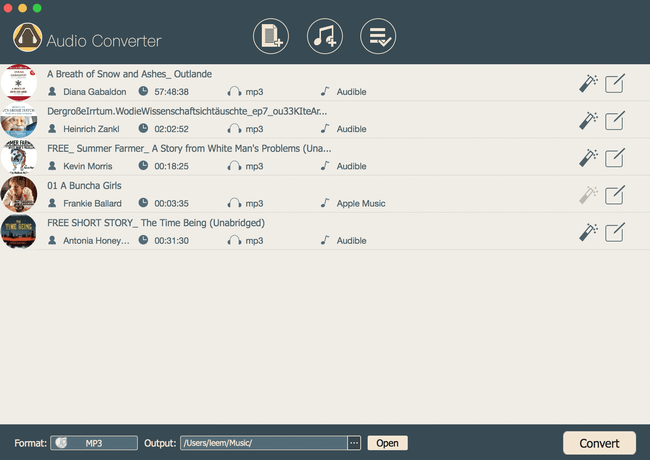
add apple music songs
Click the iTunes icon on the top menu bar and add the iTunes music and audiobooks you want to back up, after completed the installation of TunesKit DRM Audio Converter.

Step 2Choose an output format

set mp3 output format
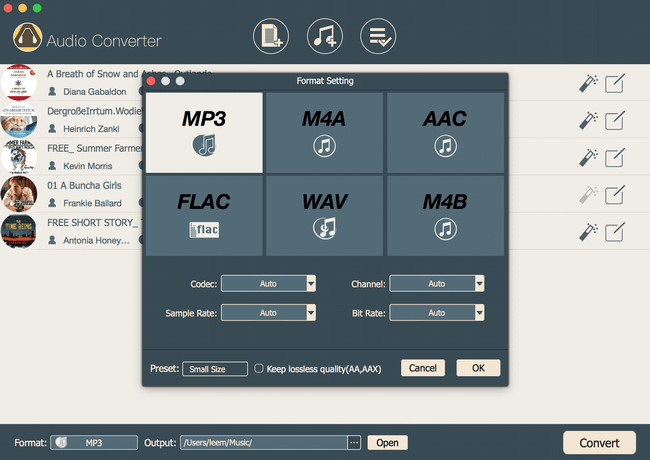
Now press the "Format" button and select an audio format for your iTunes audio files like MP3, FLAC, etc. You're also allowed to customize the channel, sample rate, etc. as you like.

Step 3Start conversion and save them

convert apple music to mp3

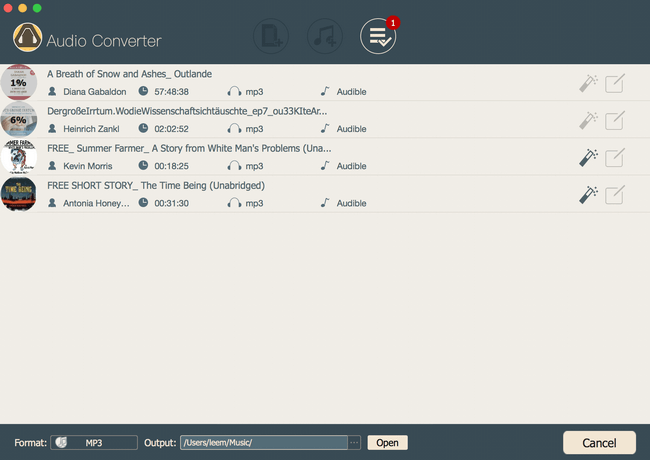
When all settings are ready, you can click the "Convert" button. Then the program will begin to remove the DRM and convert all iTunes audio files to DRM-free ones. You can find that all files are backed up and saved on your computer.

Source: https://www.tuneskit.com/reviews/export-itunes-library.html

Apr 21, 2017

TunesKit vs Noteburner vs Aimersoft: Which iTunes M4V Converter is Best

Are you fed up with the DRM (Digital Rights Management) on the iTunes movies you got? Feel annoyed that you can’t play the iTunes movies on your Android or other non-Apple devices? Don’t worry. With the iTunes movie DRM removal tools, you’ll solve this problem in seconds. Have you heard any useful tools such as TunesKit DRM Media Converter, NoteBurner M4V Converter Plus and Aimersoft DRM Media Converter? Nevertheless, here in this review, we’ll compare those three top-rated iTunes DRM video converters from different aspects, including conversion method, output quality, conversion time, speed, etc. in order to help you pick up the best iTunes M4V converter when removing DRM from iTunes videos.

TunesKit DRM Media Converter, NoteBurner M4V Converter Plus and Aimersoft DRM Media Converter are all contributed to convert the protected iTunes M4V videos to common unprotected file formats. When it comes to the effectiveness of these three tools, whose performance is the best? Just read on.

TunesKit VS NoteBurner VS Aimersoft: Converision Method


Aimersoft DRM Media Converter could be listed on the top priorities to bypass DRM from numerous types of copy-protected videos. But it is worth mentioning that Aimersoft DRM Media Cinverter can’t really remove the DRM protection and it gets the unprotected audios/videos by recording the original file. It is good news that TunesKit DRM Media Converter and NoteBurner M4V Converter Plus could convert DRM on iTunes movies and TV shows purchased and rented from iTunes store to DRM-free files.

TunesKit VS NoteBurner VS Aimersoft: Conversion Quality


The quality of conversion decides the comfort degree of enjoying videos. Here is where the difference between these three trial converters and the original file would be very apparent.


From these pictures, we can understand that the quality of TunesKit DRM Media Converter and NoteBurner M4V Converter Plus is the same as the original file, while we might be tiresome during the watching period by using the Aimersoft DRM Media Converter.

TunesKit VS NoteBurner VS Aimersoft: Conversion Process


When starting TunesKit DRM Media Converter and NoteBurner M4V Converter Plus, the iTunes will be launched by itself, which leads us to the files that we want to convert as quickly as possible by adding the files, dragging the files into the area. Besides, it is also supported to search the files into the area by NoteBurner M4V Converter Plus, whose ‘Convert’ button is not apparent. If it was your first time to use this app, you would get trouble in it. With the Aimersoft DRM Media Converter, the iTunes won’t show up until I click the button to convert videos. As a result, we must click the key words again and again to get the files that we need, which is very troublesome.

TunesKit VS NoteBurner VS Aimersoft: Conversion Time


When it comes to conversion time, TunesKit DRM Media Converter must be the solid choice. The reason is that I measured the processing time for all apps using the same roughly one-minute iTunes source movie, TunesKit DRM Media Converter just spends around 3 seconds finishing the task, NoteBurner M4V Converter Plus needs around half a minute but the Aimersoft DRM Media Converter needs more time, which is up to at least 4 minutes. Therefore, TunesKit DRM Media Converter is the fastest converter than the other two.

Conclusion: Which is the Best iTunes DRM M4V Converter?


From what have mentioned above, I could conclude that TunesKit DRM Media Converter, NoteBurner M4V Converter Plus and Aimersoft DRM Media Converter striping the restriction of DRM from iTunes movies and TV shows purchased and rental all aim to make our digital life easier and easier. But as far as I am concerned, TunesKit DRM Media Convertert and NoteBurner M4V Converter Plus are more convenient than Aimersoft DRM Media Converter as a whole. Nevertheless, which to choose between TunesKit DRM Media Converter and NoteBurner M4V Converter Plus depends on the following aspects.

If you have numerous iTunes movies in your library or you know the title of the movie you need to convert, NoteBurner M4V Converter Plus is a good choice because of the function of searching files. But according to the speed of converting videos with lossless quality, TunesKit DRM Media Converter may be the best choice. Hope this post can help you and now do you have the best iTunes M4V Converter to choose in your mind?

Nov 15, 2016

TunesKit iTunes DRM M4V Converter Full Review

iTunes FairPlay DRM copy protection makes us impossible to play purchased iTunes movies or TV shows on non-Apple devices unless we get rid of the DRM lock from the protected videos by using third-party iTunes DRM removal tools. When talking about the top-leading iTunes DRM remover, you can’t miss TunesKit DRM M4V Converter, a standout powerful DRM removal software and iTunes video converter developed to bypass DRM restriction from iTunes M4V rentals and purchases while converting the DRM-protected M4V videos tolossless MP4, M4V, and other common DRM-free video formats. It could be one of the best and fastest iTunes DRM M4V video converter tools currently in the market.

Here we’ll give TunesKit DRM M4V Converter for Mac a full review on how it performs to remove DRM from iTunes videos step by step and from different parts, including the user interface, conversion, output quality, etc.

Getting Started – Introduction to TunesKit DRM M4V Converter


System Requirements


This smart DRM iTunes M4V converter is available in both Mac and Windows versions. It’s fully compatible with Mac OS X 10.8, 10.9, 10.10, 10.11 as well as the most up-to-date macOS 10.12 Sierra, while the Windows version of TunesKit DRM Media Converter works perfectly on all Windows OS including XP, Vista, Win 7, Win 8 and Win 10. Till the time when we writing this review, it completely supports the latest iTunes 12.5.3 as well.

User Interface

First of all, the user interface of TunesKit iTunes M4V Converter for Mac is well designed with simple and neat buttons. It’s easy to understand and operate even for beginners who are non-technical to computers. Overall, the clean appearance makes using this iTunes DRM cracker for Mac intuitive and easy to use than any other similar iTunes DRM removal tools.

Converting iTunes M4V Videos


Conversion Process


As an all-in-one FairPlay DRM killer, TunesKit iTunes M4V Converter is able to completely unlock DRM restriction from both iTunes M4V movie rentals and purchases. It’s supposed to strip DRM from iTunes videos by convert the M4V files to non-DRM media formats, such as lossless MP4, M4V, HD MP4, MKV, MOV, AVI, WMV, FLV, MP3, AAC, WAV, etc. It works at up to 30X super faster speed while preserving all subtitles and audio tracks in output media files. Now let’s take a look at how to use TunesKit DRM M4V Converter for Mac to convert DRM-ed iTunes M4V to DRM-free formats.

The whole process to remove DRM from iTunes with TunesKit is combined with three simple steps only: adding files, adjusting output settings, and converting the iTunes videos. After launching TunesKit DRM M4V Converter for Mac, it will launch iTunes automatically and hide iTunes in the task bar. It provides users two ways to add iTunes movies to convert. We can just click “Add Files” button in the top center, then a window will pop up from which we can see a list of all iTunes movie files. Here we can choose the movies or TV shows we want to convert and click OK to load them into TunesKit conversion window. The other method to add iTunes M4V videos to TunesKit is drag-and-drop.

Now all movies we need to convert are listed in TunesKit properly with movie title, time length, file size, etc. Before we start to strip the DRM off, we are allowed to customize the settings according to our own needs. By clicking the Audio and Subtitle option next to the movie info, we can choose the target audio tracks and subtitles as we wish. Then we move to the bottom left to select the output format. TunesKit DRM M4V Converter for Mac supports a large number of popular video and audio formats, including MP4, M4V, AVI, MKV, MOV, MPG, FLV, MP3, WMA, WAV, OGG, AAC, and others. In addition, it provides various preset media devices, like Apple devices, Android phones and tablets, etc. Here we pick “lossless MP4” as output since it will keep output quality as the same with original movies by retaining the CC, Dolby 5.1 surround sound, AD track, multilingual subtitles, etc. The last step before start conversion is to choose the output folder by clicking Output option next to the format.

To start the conversion, simply click the “Convert” button at the bottom right of the program. Then it will begin removing DRM from the iTunes movies and converting the M4V files to lossless MP4 as expected. The progress bar will then display in the cover photo of the movie to show us the conversion status.


Conversion Speed & Quality


The conversion performance of TunesKit DRM M4V Converter for Mac is excellent as it turns out that the speed is up to 30X possible while at the same time it produces DRM-free MP4 videos in lossless quality. It takes only around 5 minutes to convert a 1 hour and a half movie. What the iTunes video actually looks like after converted? Is it lossless as advertised? To make it clearer, we are putting the screenshots of both original iTunes movie and the converted video together to compare the output quality difference.

Original M4V movie in iTunes:

original-m4v.png

Converted iTunes video:

converted-mp4.png

It’s hard to tell the difference, right? Then how about the subtitle? Is it being kept in the DRM-free video? The following snapshot will answer it:

converted-cc.png

Conclusion


TunesKit iTunes M4V Converter is highly recommended if you are frustrated by the restrictions of FairPlay DRM or need a media toolbox to convert the iTunes videos to common media so as to enjoy the iTunes movies on non-Apple devices.

Pros:

* Easy-to-use interface
* Support iTunes movie purchases and rentals
* Good file formats support
* Provide lossless output video
* Keep CC, AC3 5.1 audio, AD tracks
* Very impressive conversion speed

Cons:
* Doesn’t support iTunes Extras
* Output profiles should be improved


> Download TunesKit for Mac << | >> Download TunesKit for Windows <<

Original resource: http://www.tuneskit.com/reviews/drm-m4v-converter-review-remove-drm-itunes.html

Jul 20, 2016

TunesKit DRM M4V Converter for Mac Now Supports More Output Profiles


TunesKit Studio releases TunesKit DRM Converter for Mac 3.0.1, an important update to their popular DRM removal solution for OS X. Get full control over the media items you legally purchased from iTunes Store. With this new release, users can easily remove the DRM lock from iTunes videos while converting the protected M4V files to unprotected videos, including MP4, MOV, M4V, AVI, MKV, FLV, as well as MP3, M4A, AAC and other audio formats.

As the industry-leading DRM removal solutions provider, TunesKit Studio recently released a major update of its featured iTunes DRM Media Converter for Mac to v.3.0.1 with more impressive features introduced, including more output media formats, preset profiles of popular devices, re-designed new user interface, etc. Now with the newest version of TunesKit M4V Converter for Mac, users can easily remove DRM lock from iTunes rented and purchased videos while converting the encrypted M4V files to DRM-free MP4, M4V, MOV, AVI, FLV, MPG, and other common video and even audio formats with lossless quality.

Differs from the previous versions that can only convert DRM-ed iTunes movies to lossless DRM-free MP4, the latest release of TunesKit DRM M4V Converter for Mac v.3.0.1 adds full support to more popular output media formats, such as MP4, M4V, MOV, AVI, MKV, MPG, 3GP, FLV, SWF videos, as well as common audios, like MP3, AAC, M4A , etc. It still supports 1080P full HD iTunes movies conversion while keeping the original video quality, AC3 5.1 surround audio, closed captions for lossless MP4 and M4V output. Besides, it allows users to customize the output video and audio parameters, such as the bit rate, codec, size, channel, etc.

The updated TunesKit DRM Media Converter also adds multiple preset output profiles for popular mobile devices, including Apple iPhone 6S, iPhone 6, iPad, iPod, Apple TV, Samsung Galaxy, HTC One, PS4, Xbox 360, Google Nexus, Sony Xperia, and other Android phones or tablets. Thanks to those convenient ready-made profiles, TunesKit users could now transfer the iTunes M4V videos to any media playing devices for watching more easily.

The other big change of the new DRM Media Converter is the brand new user interface. In order to make it more clean and easy-to-use, TunesKit developers re-designed the interface with simpler layout, larger operation window and neat buttons. Any user can handle the software with ease, even for those who are not skillful to computers. It only takes a few clicks to get rid of DRM completely from a protected iTunes video file.

In addition to those major updates, TunesKit DRM Media Converter for Mac also fixed some minor bugs and optimized the product performance as well. Despite of the new benefits, some long existing great features, like the 30X faster conversion speed, and batch conversion are also retained in the new version. With all these stunning features, TunesKit iTunes DRM M4V Converter for Mac is expected to provide users a better DRM removal experience.

Till now, TunesKit DRM M4V Converter for Mac is fully compatible with the latest Mac OS X EI Capitan 10.11.6, 10.10, 10.9 and 10.8 with the latest iTunes v.12.4 installed. And it will get frequent updates to support every new upcoming release of Mac OS and iTunes version.

According to Andres, the product manager of TunesKit, similar update for their Windows version of DRM Media Converter is under progress now and will be launched very soon.


More about TunesKit DRM M4V Converter for Mac

TunesKit for Mac is one of the best iTunes DRM removal tools in the world specially designed to easily and completely remove FairPlay DRM encryption from purchased and rented iTunes movies, TV shows and music videos by converting the protected MPEG-4, well known as M4V, to unprotected media formats, such as MP4, M4V (non-DRM), MOV, AVI, FLV, SWF, MPG, 3GP, MP3, AAC, M4A, etc. with high quality. By adopting an advanced DRM decrypting technology, this smart iTunes DRM cracker is also able to keep the original AC3 5.1 surround audio, closed captions, and multilingual subtitles as you like. It could be the ultimate iTunes DRM removal solution that empowers you get away from FairPlay DRM lock and ever since get full control over the media items you legally purchased from iTunes store.

Jan 20, 2015

Last Call: Join TunesKit New Year Promotion for $10 Coupon of iTunes DRM Video Converter

To celebrate the new year of 2015, TunesKit Studio has launched its new year promotion in early December last year with which customers are supposed to get a coupon code worth $10 of TunesKit featured iTunes DRM Video Converter products once they share the promotion page on their Facebook account. Since the new year offer was originally set to be valid until Jan 31, 2015, there’s only a few days before the deal comes to an end. That’s to say, it’s the last chance for the customers to join the promotion to get TunesKit iTunes DRM Video Converter with $10 off.

Brief Introduction to TunesKit iTunes DRM Video Converter

TunesKit iTunes DRM Remover, as one of the best iTunes DRM removal tools in the world, is specially designed to help iTunes users remove FairPlay DRM protection from iTunes movie rentals and purchases while converting the DRM-locked M4V format to non-DRM MP4 files with lossless quality. This smart iTunes DRM removal software comes with both Mac and Windows versions which have an easy-to-use interface that makes it handy to process the whole iTunes DRM removing in three steps only. Users only need to add the iTunes movie files, choose the output settings, and then it will do all the rest job to convert Christmas movies and TV shows or any other videos downloaded from iTunes to multiple devices and media players such as Samsung, HTC, Nokia, Nexus, Kindle Fire, VLC, Chromecast, HDTV, etc.

For more details of this special deal, please visit the promotion page from the official site of TunesKit: http://www.tuneskit.com/2014-xmas-specials.html.

About TunesKit

TunesKit Studio is a professional multimedia software developer dedicated to providing the best iTunes DRM removal solutions and services, including both Mac and Windows versions of iTunes DRM Video Converter to customers throughout the world. As a reliable DRM removal solution provider, TunesKit also offers free life-long software upgrade and prompt online support for users. All DRM products sold on TunesKit are home edition for personal use only.

Jan 15, 2015

[Review] TunesKit iTunes DRM Video Converter – Convert DRM-ed iTunes M4V to MP4


Getting tired of DRM?  Ever been looking for a way to watch DRM-free iTunes movies but eventually ended in smoke? No matter how annoyed you used to be with DRM, you can be totally relieved upon the release of TunesKit iTunes DRM Video Converter, a smart yet mighty iTunes DRM video converter specially created to liberate you from DRM restrictions once and for all!

What Can TunesKit iTunes DRM Video Converter Actually Do

As one of the best integrated DRM removal and iTunes M4V converter software, TunesKit can not only remove DRM protection from both iTunes movie rentals and purchases, but also convert DRM-locked iTunes video files to non-DRM MP4 format with fast speed and high quality.

Moreover, TunesKit iTunes DRM Media Converter is able to keep AC3 Dolby 5.1 audio tracks, multi-language subtitles, and 1080P HD video resolutions while removing the DRM limitation from iTunes movies and TV episodes.

Distinguished from any other iTunes DRM removal tools in the market, TunesKit employs an innovative DRM decrypting technique which enables it to be the  fastest iTunes DRM video converter to strip DRM off iTunes movie files and convert those protected videos to unprotected format at 20 times faster speed.

Thanks to this powerful iTunes DRM remover, you will be free to enjoy DRM-free  iTunes movies and TV shows on multiple popular devices and players, including Android, iOS, Windows phones & tablets, etc.

Why We Need to Remove DRM

As is known to all, iTunes videos are protected by Apple’s FairPlay DRM copyright policy which restricts iTunes users to play those files on iTunes or other Apple products only. That is to say, you are not allowed to copy and convert iTunes movies to other formats or devices for playback even after you buy the movies.

What’s worse, if you rent a movie from iTunes store, you only get 30 days to watch the movie, and 24 hours (US) or 48 hours (other countries) to finish it once you started to watch.

Since DRM has always been so controversial, DRM removal software are being developed to solve the argument.

What to Look for in TunesKit iTunes Video Converter

When you are looking for the best iTunes DRM remover and converter, you'll expect it to be with strong performance, easy-to-use interface and helpful technical support, right? Whatever it should be, TunesKit iTunes DRM Video Converter is supposed to meet all your requirements to remove and convert DRM-ed iTunes videos.

High Performance

Being an ultimate DRM removal solution for iTunes, TunesKit is set to be integrated with both DRM removing and iTunes video converting features. And due to the unique DRM decrypting core, it empowers you to convert tons of protected SD or HD iTunes M4V movies to common MP4 with 100% original quality preserved in just a few minutes.

Ease of Use

TunesKit comes with a very easy-to-use interface which makes everyone the master of DRM removal. You are presented with a clear layout screen which contains everything you need from the beginning to the end. You only need to select the iTunes files you want to convert and then leave the rest job to the program itself.

Support & Upgrade

Good support is an extra bonus for an iTunes DRM media converter. TunesKit provides you with prompt technical support regarding any product problems including user tutorial, registration issues, etc. It also offers free lifelong software upgrade to all paying users.

Conclusion


Whether you are a huge movie fan that are searching for an effective way to manage your iTunes video collections freely, or a new comer for iTunes who like to enjoy more fun of iTunes movies, TunesKit iTunes DRM Remover is a reliable assistant you cannot miss.

Dec 25, 2014

How to Remove DRM from iTunes Rentals without Quality Loss


Many of you may need to remove DRM protection from iTunes movie rentals for different reasons, for example:

1.    Movies rented from iTunes are locked by FairPlay DRM so that you can’t directly stream them to non-Apple devices for playback;
2.    iTunes movie rentals come with a solid period of validity which allows you to keep the movies for 30 days only and forces you to finish watching the rentals within 24 hours once you started to watch it.

In fact, there are various ways to crack the DRM from iTunes rentals thus to make them to be playable on any digital media players. However, one thing to note is that not all of them can preserve the original video quality of the iTunes rented movies after removing the DRM. To be honest, only few of them can remove the DRM with lossless quality preserved. Here in this article, we will introduce one of the best iTunes DRM removal software to help you bypass DRM protection from rented iTunes movies losslessly on Mac.

This magic iTunes DRM remover is called TunesKit DRM Video Converter for Mac. It’s a smart yet powerful DRM removal tool for iTunes rentals to remove FairPlay DRM from iTunes movie rentals as well as convert the protected iTunes rented movies to non-protected MP4 format with 100% original HD video quality retained. In addition to lossless video quality, this professional iTunes DRM video converter can also keep the Dolby 5.1 surround audio tracks and subtitles while removing DRM from iTunes rented movie files.

Now you may follow the steps to begin losslessly removing DRM from iTunes movie rentals and converting the rented videos to DRM-free MP4 on Mac OS X 10.8 or later.

Tutorial: Convert DRM iTunes Rentals to MP4 with Lossless Quality

Step 1. Load Rented iTunes Movies from Library

You can either add the iTunes rentals by clicking “Add Files” button in the program or by directly dragging & dropping the iTunes rented movie files to the program.

Step 2. Customize Output Audio Tracks & Subtitles

Click “settings” icon listed behind the movie name to choose the audio tracks and subtitles for the output iTunes movie rentals.

Step 3. Start to Remove DRM from iTunes Rentals Losslessly

Once all the settings are done, you can click “Convert” button to begin removing DRM from iTunes rented videos and converting the DRM-ed M4V rentals to MP4 with original quality kept.


After the DRM removal process, you can find the lossless DRM-free iTunes rentals and transfer them into any non-Apple devices for watching as you like.

Dec 2, 2014

Simple Solution to Convert iTunes Movies to Windows Phones & Tablets


For Windows phone users who like to buy movies and TV shows from iTunes Store, the biggest annoyance is that they are not allowed to directly enjoy iTunes movie purchases on their Windows devices, simply because all movies and TV series on iTunes are protected by DRM. They have to firstly bypass the DRM protection in order to stream the iTunes movies to Windows phones or tablets for watching. What’s worse, there are few iTunes DRM video converter software is able to do the job as advertised. But it’s history now. Here you will be recommended the most popular yet best iTunes to Windows Phone/Tablet Video Converter to help you remove DRM from iTunes videos and convert them to Windows phones and tablets for playback.

This powerful iTunes DRM removal tool is TunesKit iTunes to Windows Phone/Tablet Video Converter comes from the world-leading DRM solution provider. As you should know, because of the DRM protection, iTunes movies and TV shows are encrypted in M4V format which can’t be recognized by Windows devices, but only Apple’s. So in order to make those protected iTunes M4V videos playable on Windows phones and tablets, you must remove the DRM as well as convert the iTunes M4V videos to MP4 or other DRM-free video formats supported by most Windows phones or tablets. That’s why TunesKit iTunes M4V Video Converter could be the most proper tool for you. By adopting an unique DRM decrypting technique, this iTunes to Windows Phone/Tablet Video Converter is able to get rid of DRM from iTunes movies and TV shows while converting the DRM-ed M4V to unprotected MP4. After that, you are enabled to transfer the DRM-free iTunes video files to any Windows phones or tablets for watching without worrying about the limitation.

Let's make the magic happen now by showing you step-by-step tutorial to convert iTunes M4V movies to Windows devices with TunesKit iTunes DRM Video Converter for Windows. You can find the Mac version here: TunesKit iTunes to Windows Phone/Tablet Converter for Mac.

Step 1. After launching TunesKit iTunes Video Converter for Windows, click “Add Files” button in the program to import iTunes M4V movies and TV shows you want to put onto Window phones or tablets from the drop-down list. Then load the movies by clicking “OK”.

Step 2. Once the iTunes movies are loaded successfully, you may adjust the settings, including video path, audio tracks, subtitles for the upcoming output MP4 video files.

Step 3. Now you can begin to convert iTunes M4V movies to Windows devices by clicking “Convert” button.

That’s it. When the conversion finishes, you are able to find the DRM-free iTunes movies and stream them into your Window phones or tablets, such as Nokia Lumia, Microsoft Surface, etc for watching.

More about Windows Phones & Tablets

Windows Phone, also known as WP, is a smartphone operating system developed and first launched in October 2010 with Windows Phone 7 by Microsoft. Currently, the latest version is Windows Phone 8.1 which was released in final form to developers on April 14, 2014. It is a great mobile operating system with intuitive, simple UI and all the features for those new to smartphones and for business users thanks to its integration with Windows 8 and Microsoft Office.

Nokia, now the Microsoft-owned company, is currently the primary manufacturer producing Windows Phone devices. So if you're looking for the top Windows phones, start with Nokia's. Some models like Lumia 1520, Lumia 1020, Lumia 830, Lumia 735, etc are great choices. 


Just like the Windows phone, Windows tablet is a tablet computer running Windows OS. When talking about the best Windows 8 tablets, votes would probably go to Microsoft Surface Pro 3, the latest generation of Surface series.  

Dec 1, 2014

Guide to Remove FairPlay DRM from iTunes M4V Movie Rentals & Purchases


Brief Introduction of FairPlay DRM Copy Protection

FairPlay, a digital rights management (DRM) technology created by Apple, is specially adopted to encode movies, TV shows and music videos sold in its iTunes Store. The majority of FairPlay-encrypted files, commonly known as M4V format, are regular MP4 container files with an encrypted AAC audio stream. Due to FairPlay DRM protection, all video files purchased or rented from iTunes are restricted to be played on iTunes compatible software or devices only. And for the iTunes movie rentals, users only get 30 days to watch the movies and 24 hours or 48 hours to finish watching once started.

Is It Possible to Bypass FairPlay DRM from iTunes Video?

Because of the unfair rules, FairPlay DRM encryption has been opposed by most iTunes customers ever since the implement. Since the trend to remove FairPlay DRM from iTunes movies is growing day by day, something called FairPlay DRM removal software came out to meet the requirements. Here in this article, we would like to introduce you one of the best iTunes FairPlay DRM remover to bypass FairPlay DRM protection from iTunes M4V movie rentals and purchases legally.

Best FairPlay DRM Removal Tools

Among the numerous iTunes FairPlay DRM removal tools, the best and fastest one is TunesKit iTunes FairPlay DRM Cracker which is dedicated to strip DRM protection off rented and purchased iTunes movies, TV shows and music videos with 20x faster speed. It’s able to losslessly convert the protected iTunes M4V videos to DRM-free MP4 format while removing the FairPlay DRM from the movies. What’s more, it can keep the 100% original Dolby AC3 5.1 audio, subtitles and video quality after conversion. Once converted, you are able to enjoy the non-FairPlay-DRM locked iTunes movies and TV episodes on any portable devices like Samsung, HTC, LG, Nokia, BlackBerry, PPS, etc.

How to Get Rid of FairPlay DRM Protection from iTunes M4V Videos

Here let’s take TunesKit iTunes DRM Removal for Mac for example to see how to bypass DRM copy protection from iTunes M4V movies and TV shows on Mac with 3 steps only. Windows users can refer to TunesKit iTunes DRM Remover for Windows for the FairPlay DRM removal.

Step 1. After launch TunesKit FairPlay DRM Converter for Mac, click “Add Files” button to select the iTunes M4V movies you want to convert. Then click “OK” to load the files. Or you can also import the iTunes videos by directly dragging and dropping the M4V files into the program.

Step 2. Click the “settings” icon in the program to customize the output audio tracks, subtitles by yourself. Otherwise it will keep all the 5.1 surround audio tracks, stereo audio tracks and subtitles automatically.

Step 3.  Once all the M4V movies are added, you can start to remove the FairPlay DRM and convert the iTunes files to MP4 format by clicking “Convert” button.


After conversion, you can find the non-DRM iTunes videos in the output folder and put them onto any mobile devices to enjoy.

You can also use TunesKit for Windows to remove DRM from iTunes movies on Windows platform.