Showing posts with label spotify to mp3. Show all posts

Nov 20, 2019

How to Convert Spotify to MP3? Tools and Tutorials

Still looking for the best tool to convert Spotify to MP3? Well, you can stop here to pick one from these 5 best Spotify converters to download Spotify music and save as MP3 audio format for listening on any device anywhere.

#1. TunesKit Spotify Music Converter (Mac & Windows) - Best & Lossless Way
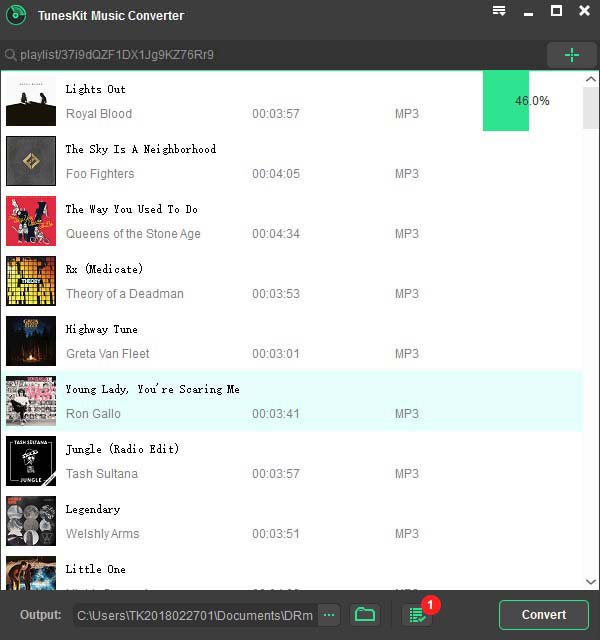
tuneskit spotify to mp3 converter
If you are looking for the best Spotify playlist converter tool in the market, you should opt for TunesKit Spotify Music Converter for Windows (or for Mac). It's the fastest Spotify MP3 converter tool that can convert the Spotify songs to MP3 at up to 5X faster speed. It supports downloading and converting all Spotify music types, including tracks, albums, artists and playlists by simply dragging the songs from Spotify app to the conversion window.

Unlike the traditional Spotify converter, TunesKit Spotify Music Converter is not a Spotify recorder but a professional Spotify ripper and downloader that supports losslessly convert the protected Spotify to MP3 with original quality and ID tags retained. In addition to MP3, this smart tool also supports AAC, WAV, FLAC, M4A and M4B output audio formats. Besides, it allows you change the audio properties, like audio channel, bit rate, sample rate, etc. and save the converted MP3 songs automatically by albums and artists, all depends on your own needs.

Pros:
  • 1. Download and convert Spotify music to MP3 offline;
  • 2. Keep 100% lossless music quality after conversion;
  • 3. Support 5× super faster speed and customization.
Cons:
  • 1. It's not free.
Tutorial: How to Convert Spotify to MP3 with TunesKit Spotify Music Converter

Due to the great design and neat interface, it's extremely easy to convert Spotify music to MP3 using TunesKit Music Converter for Spotify even without reading the user manual. The following is the simple steps to show you how to do it.

Step 1. Launch the TunesKit Music Converter for Spotify on your computer, and Spotify app will be opened automatically;
Step 2. Drag the songs/albums/artists/playlists from your Spotify account to the TunesKit program, and then choose the output format and set the parameters in the Preferences window under menu bar.
Step 3. Then click Convert to begin converting the Spotify songs to MP3 or other common formats. For stable conversion, simply set the conversion speed as 1×.

#2. Audials Tunebite Premium 2018 (Windows)
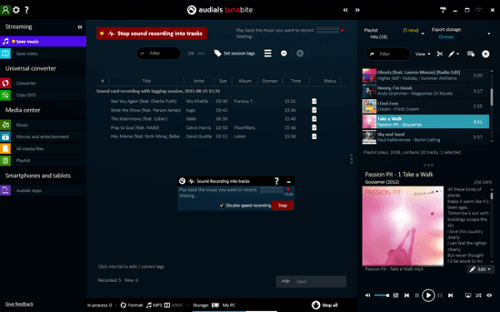
audials tunebite premium
Audials Tunebite is a smart audio recorder software for recording music streams and converting audio formats on Windows. It's also a music player that can manage music for all devices. With Audials Tunebite Premium 2018, you can record Spotify online streams and all other protected as well as unprotected audios from different websites. Then the music will be copied and converted to MP3 up to 40 audio file formats for playing on all popular smartphones, tablets and gaming consoles.
Pros:
  • 1. Record and convert Spotify music to MP3;
  • 2. Support other types of DRM-ed audios.
Cons:
  • 1. A little complicated to operate;
  • 2. Recording could cause quality loss;
  • 3. Support Windows OS only.

Tutorial: How It Works in Converting Spotify Music to MP3

Step 1. Launch the program, click the Save Music in Streaming column and import the downloaded Spotify songs to the main interface.
Step 2. Click "Save" button at the bottom and it will begin to record the songs automatically. Once the recording completes, you should go to Converter panel and convert the recorded audios to MP3 format.
Note: It's not easy to download and convert the Spotify music to MP3 via Audials as there are too many buttons in the conversion window. So it's not recommended if you are not a tech geek.

#3. Wondershare Streaming Audio Recorder (Mac & Windows)
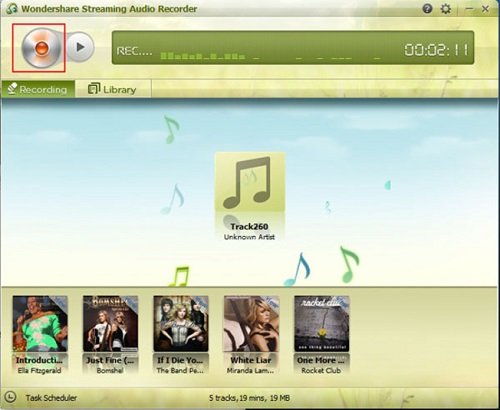
wondershare streaming audio recorder
Wondershare Streaming Audio Recorder, as the name suggests, is also an audio recording software that aims to record music from 500+ streaming sites, including Spotify, iTunes radio, BBC radio, etc. So with this tool, you can easily record and convert the Spotify to MP3 or M4A format while filtering the ads in the songs. Besides, it supports splitting and cutting Spotify songs and other large audio files into small segments according to your own requirements.
Pros:
  • 1. Record Spotify and music from other 500 streaming music sites;
  • 2. Convert and save Spotify songs as MP3.
Cons:
  • 1. There could be some quality loss due to recording.

Tutorial: How to Record Spotify to MP3

Step 1. Simply hit the "Record" button to make the program ready for working.
Step 2. Go to Spotify and start to play the song. Then Wondershare Audio Recorder will detect the Spotify audio and start recording Spotify songs to MP3 or M4A format automatically.

#4. Playlist-converter.net Spotify to MP3 Online Converter (Mac & Windows)
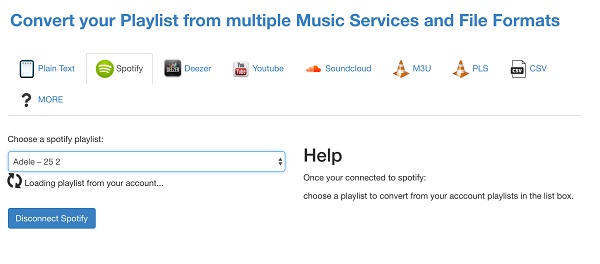
spotify playlist converter
Playlist-converter.net is a free online app allows you to convert Spotify playlists and other services like Deezer, YouTube, etc. It enables you free convert Spotify music to MP3 format without installing any extra software.
Pros:
  • 1. A free online Spotify converter MP3 tool;
  • 2. Support different music streaming sites.
Cons:
  • 1. It takes much time to download and convert the Spotify playlist;
  • 2. Output quality could be poor.

Tutorial: How to Convert Spotify Songs to MP3 Online

Step 1. Firstly open the website and then click Spotify panel. You'll be asked to log into the Spotify account firstly.
Step 2. Next choose a playlist you created in your Spotify account and begin to convert it to MP3 format.
Step 3. Then it will generate the converted playlist with the Download button. You only need to click the Download button to access the converted Spotify music without hassle.

#5. Chrome Extension Deezify (Mac & Windows)
deezify chrome
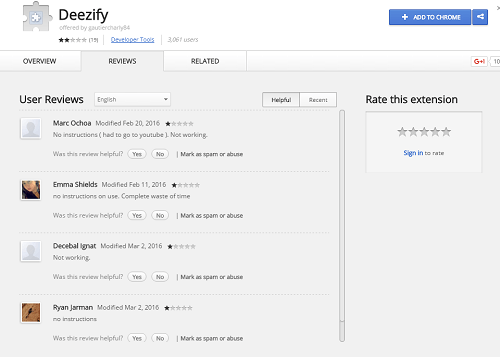
Deezify is another free Spotify converter and downloader that can convert Spotify music to MP3 without recording. It's an extension from Chrome browser. Under the help of Deezify, you can download music from Spotify, Deezer, Xbox Music without limits and ads on both Windows and Mac as long as you have installed Chrome.
Pros:
  • 1. Free convert Spotify to MP3;
  • 2. Easy to use.
Cons:
  • 1. Not always works when downloading Spotify songs.

Tutorial: How to Convert Spotify to MP3 via Deezify Plug-in

Step 1. First of all, install the add-on Deezify from Chrome.
Step 2. Then open Spotify in the browser and play the Spotify songs you want to convert to MP3 so that Deezify will help you to get the MP3 file.

Note: However it's not stable of all time. So it's worth mentioning it won't work properly sometimes.

Any ideas or suggestion about Spotify to MP3 converters? You can share your experience with us.

Source: https://www.tuneskit.com/spotify-music-tips/top-5-spotify-converter.html

Feb 5, 2018

[Reviews] Top 3 Best Spotify Downloader of 2018


If you use Spotify, you should know that only premium users are able to download the streaming music with high quality for offline listening. Free users can only listen to the songs online with random ads occurring during playback. Luckily, as the demand of downloading Spotify music grows rapidly among free users, many Spotify downloaders have been developed and released through the internet, including free and paid solutions. However, since not all of them work as advertised, in order to save your time and energy, we took your job and made a top list of the 3 best Spotify playlist downloaders of 2018 that are 100% working, in consideration of software security, ease of use, performance, quality and more.

No 1. TunesKit Spotify Music Downloader (Mac & Windows)


TunesKit Music Downloader for Spotify is one of the best music downloader and manager for Spotify. It’s able to help any Spotify user, both free and premium to download any track, album, artist and playlist from Spotify for offline playback. By saving the downloaded Spotify songs as MP3, AAC, WAV, FLAC and other popular formats with lossless quality, it enables you enjoy Spotify music on any MP3 player as you want. Only with one click, you can download any ads-free Spotify track or playlist with original ID3 tags preserved at 5X speed. You are also allowed to edit the output music quality by setting audio codec, bit rate, sample rate according to your own requirements.

Pros:
  • Exclusive lossless Spotify music downloader;
  • Directly download Spotify playlists in one click;
  • Save Spotify music in MP3, AAC, FLAV, WAV, M4A, M4B;
  • Keep ID3 tags;
  • No extra hardware required, very easy to use.

Cons:
  • Only English UI available.

See also:
How to Download Spotify Music as MP3 with TunesKit.

No 2. KeepVid Music


KeepVid Music, also known as iMusic, is a comprehensive streaming music downloader that works not only with Spotify, but also downloads playlists from over 3,000 music sites such as Pandora, Deezer, Tidal, Google Play Music, etc. It’s also serving as an all-in-one music manager, allowing you easily download, manage and share Spotify playlists in high quality. In addition to downloading Spotify music, it can also record any song play through your computer. If you have any need to transfer media between iDevices without iTunes, KeepVid Music will immediately get it done for you.

Pros:
  • Support direct downloading as well as recording;
  • Download Spotify and other 3000+ streaming music sources;
  • Transfer downloaded Spotify songs to iOS devices easily;
  • Fix ID3 tags.

Cons:
  • Support MP3 output only.

No 3. Spotiload (formerly called Spotify VK Downloader)


Formerly known as Spotify VK Downloader, Spotiload is actually a chrome extension which uses vk.com social network to download songs from any Spotify playlist and save them in MP3 format. It can be easily found in extension section on Chrome browser. Once installed, it will require you to log into a vk.com account. Then you can simply create an account and go to Spotify to browse the playlists you want to download offline. From the Spotiload toolbox, you can select the tracks and click the “Download” button to get the songs.

Pros:
  • Easy to install;
  • Free of charge.

Cons:

  • Using vk.com is illegal and not allowed in some countries;
  • Only download Spotify songs available on vk.com;
  • Unstable when downloading Spotify songs with multiple artists;
  • Output music quality is lossy.

Conclusion & Suggestion

To sum up, if you care much about the downloading speed and quality of Spotify songs, TunesKit Spotify Music Converter could be the best option with an affordable price. If you want to download not only Spotify music, but also other streaming tracks, KeepVid Music is the top priority. If you however considering a free solution, you can go for Spotiload. If you know any other efficient Spotify playlist downloader, please don’t be hesitate to leave you comments below.

Jul 24, 2017

How to Convert Spotify Online Tracks to MP3 on Windows


Converting Spotify music to MP3 or other formats could be a common request for most Spotify users, especially those free subscribers. As one of the largest online streaming music services in the world, Spotify is claimed to have more than 140 million monthly active users by June 2017. However, among those subscribers, only the premium members are authorized to download and listen to Spotify music offline. The free membership users can only stream the music online without the right to download the songs for offline listening. What’s more, there’s also restriction for even the premium subscribers as they can only download the Spotify tracks on three devices. So in this case, it’s necessary to find a way out to download the Spotify music to play offline. In the following article, we’ll discuss the simple solution to download as well as convert any Spotify music track to MP3 format for any player and device.

Best Spotify Music Tool – TunesKit Spotify to MP3 Converter for Windows

Now you meet TunesKit Spotify Converter, the best and fastest Spotify music downloader and converter that’s well designed to easily extract Spotify streams and convert the DRM-protected songs to common MP3, M4A, AAC, WAV, FLAC, M4B formats for offline playing on any popular MP3 player and device, such as iPod, Zune, Creative Zen, iRiver, Sony Walkman, iPhone, Android phones and tablets, etc.

Key Features of TunesKit Spotify Music Converter

  • Remove DRM from Spotify tracks, albums, artists, and playlists
  • Add Spotify music files by dragging the songs and albums directly from Spotify app
  • Download and convert Spotify songs to MP3, AAC, M4A, M4B, FLAC, WAV
  • Transfer all Spotify songs to any player for offline listening
  • Work at up to 5X faster speed with lossless quality preserved

Complete Tutorial to Convert Spotify Songs to MP3 with TunesKit

The following will introduce the whole steps to convert your DRM-ed Spotify online streams to MP3 format with TunesKit Spotify to MP3 Converter for Windows.

Step 1. Drag Spotify tracks to TunesKit

You don’t need to download the Spotify songs in advance. You can simply open TunesKit and it will launch Spotify software automatically. Then in the Spotify app, you can search for any track or album or artist you want to convert and then drag the online streams from Spotify to TunesKit Spotify Converter. Then the Spotify music will load automatically. Or you can paste the link of the Spotify songs in the search box of TunesKit conversion window.

Step 2. Choose output settings

Now click the menu bar and choose Preferences. In the popup window, you can select the output format as MP3 and adjust other properties, such as channels, bit rates, sample rates, etc. You can also set the conversion speed and output directory according to your own needs.

Step 3. Convert Spotify music to MP3

When everything is set OK, simply click “Convert” button and it will begin to convert your Spotify tracks and albums to MP3 format at up to 5X faster speed.