Jul 29, 2019

TunesKit iOS System Recovery Now Supports to Fix Apple TV Problems

As a well-know multimedia software provider, TunesKit Software recently make a great upgrade to its iOS utility - TunesKit iOS System Recovery, which is now capable of fixing all different Apple TV system issues such as the screen stuck in reboot loop, won't update, keep crashing, blue or black screen of death, etc. without causing any damage to the data.

No matter the Apple TV is stuck in the recovery mode, Airplay mode or stuck on the white Apple logo, no sound, black screen, won't update, keeps crashing, etc., users can easily take advantage of TunesKit iOS System Recovery to repair them with no need to ask help from technical personnel. To ensure a high success rate, it offers two recovery modes (Standard Mode and Advanced Mode) to either fix some common tvOS problems with no data loss or factory reset Apple TV to deep repair the system without saving endeavors.

With its assistance, users are permitted to fix all kinds of tvOS problems in 3 simple steps, namely, connect the Apple TV, download and verify the firmware package, start to repair tvOS issues. Its clear interface and neat buttons make it easily to be operated by anyone, even if he or she has never used such kinds of program before.

"We start to develop this feature in support of Apple TV is mainly because that many users have encountered such tvOS problems, and they might not want to take it to the offline store for help," said Andres, the R&D director of TunesKit. "With the help of TunesKit iOS System Recovery, they can now easily handle and solve some common tvOS related issues on their Apple TVs easily at home by themselves," added him.

Actually, TunesKit iOS System Recovery is a versatile utility which works more than just a tvOS repair tool. Besides repairing Apple TV, it is capable of fixing dozens of iOS issues on iPhone, iPad and iPod touch, including iPhone stuck in boot loop, headphone mode, blue screen or white screen, iPad is locked or disabled, etc. Furthermore, users can one click to get their Apple TVs or iOS devices into or out of the recovery mode for free.

What's New in TunesKit iOS System Recovery 2.0.0

[Version Number: 2.0.0]
* Support to fix any tvOS problem on Apple TVs
* Compatible with Apple TV HD/3rd generation/2nd generation
* Fix some other small bugs

Price and Availability

TunesKit iOS System Recovery provides a free trial version for users to enter/exit the recovery mode for free or test the iOS system recovery performance before buying it. However, the trial version doesn't allow users to repair the problem and they need to upgrade to the full version in order to really solve the issue. As for the prices, it ranges from $39.95 to $299.95, depending on the type of license from one device to unlimited ones.

This program is available for all common Windows and Mac platforms, including the latest Windows 10 system, macOS 10.13 High Sierra and 10.14 Mojave. Besides, it is compatible with almost all models of Apple TV, iPhone, iPad and iPod touch.

About TunesKit

TunesKit Studio is the world's leading multimedia software developer, specializing in developing and providing the best media editing and converting software. Their quick and easy solutions help more than 5,000,000 customers worldwide restore iOS/tvOS system, recover lost iOS data, edit and convert iTunes movies, Apple Music, Spotify songs, Audible audiobooks for years.

Source: https://www.tuneskit.com/releases/tuneskit-ios-system-recovery-supports-apple-tv.html

Jul 23, 2019

Apple Today Releases tvOS 12.4 for 4th/5th Gen Apple TV


Apple today released tvOS 12.4, the eighth update to the tvOS 12 operating system that runs on the fourth and fifth-generation Apple TV models. tvOS 12.4 comes more than a month after the release of tvOS 12.3, which brought an updated TV app.

tvOS 12.4 is a free update that can be downloaded over the air through the Settings app on the Apple TV by going to System > Software Update. Apple TV owners who have automatic software updates turned on will be upgraded to tvOS 12.4 automatically.


There were no new features discovered during the beta testing period for tvOS 12.4, making it unclear what's included in the update.

Apple does not provide release notes for tvOS updates, making it difficult to determine what might be new or improved in the operating system.

The update likely focuses on introducing performance improvements and bug fixes, and there could be some refinements to the TV app that was introduced in tvOS 12.3.

Apple has also released new 7.3.1 Apple TV software that's designed for the third-generation Apple TV.

Note: If you have any problems while using Apple TV, you can ask TunesKit iOS System Recovery for help since this powerful utility is able to fix lots of Apple tvOS issues such as  restart loop, no sound, crashing, black screen, etc. by yourself within a few minutes.

Source: https://www.macrumors.com/2019/07/22/apple-releases-tvos-12-4-update/

Jul 21, 2019

3 Possible Ways to Recover Data from Locked/Disabled iPhone


Have you ever encoutered that the iPhone is disabled after entered the wrong password for many times? For many people who're experiencing it, the data on the phone may means more than the device itself. No worries, you can now read this article and learn 3 possible ways to get your back from a locked iPhone.

Part 1 Recover Data from Locked iPhone without Backup

If you don't have the habit of backing up your iPhone data, it doesn't matter, just use TunesKit iPhone Data Recovery, which will help you recover data from your locked iPhone in the shortest amount of time in the case of no backup. This iPhone Data Recovery tool is truly the most efficient and convenient one for you to choose. The reason why it is recommended is listed below.
TunesKit iPhone Data Recovery Key Features
  • Restore Multiple Data on Your Device - TunesKit iPhone Data Recovery is able to retrieve about 20 kinds of lost data including call history, SMS, iMessages, photos, videos, notes, calls, WhatApp/Kik/Viber messages, voice memos, Safari bookmarks, reminders, calendars, etc.
  • 3 Smart Data Recovery Modes - You can easily find back all deleted data in three smart recovery modes basing on different loss situation thanks to the advanced data recovery technology applied in TunesKit, that is, recover from iPhone directly, recover from iTunes Backup and from iCloud Backup.
  • Fully compatible with all iOS devices - TunesKit iPhone Data Recovery for Windows is highly regarded for its full compatibility with the latest iOS devices running iOS 12, including iPhone X , iPhone 8, iPad 4, iPad Pro, iPad Air, iPod touch 5 and more.
  • Easy-to-use interface - This software is totally user-friendly, which embodied in the simplification of the file restoring process. What you need to take are 3 steps. Firstly, connect your iPhone to the computer with USB cable. Secondly, scan and preview loss data. Thirdly, select and recover deleted files.
You can download a free trial version of TunesKit iPhone Data Recovery for Mac or Windows on your computer in advance, and then follow the tutorial below to learn the methods of recovering data from locked iPhone in 3 easy steps.

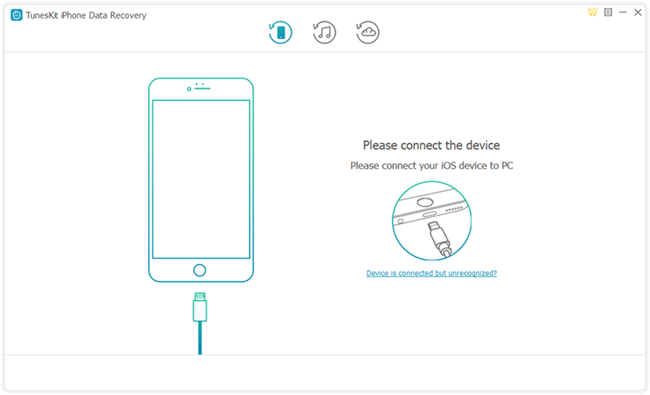
Step 1 Connect iPhone to Computer

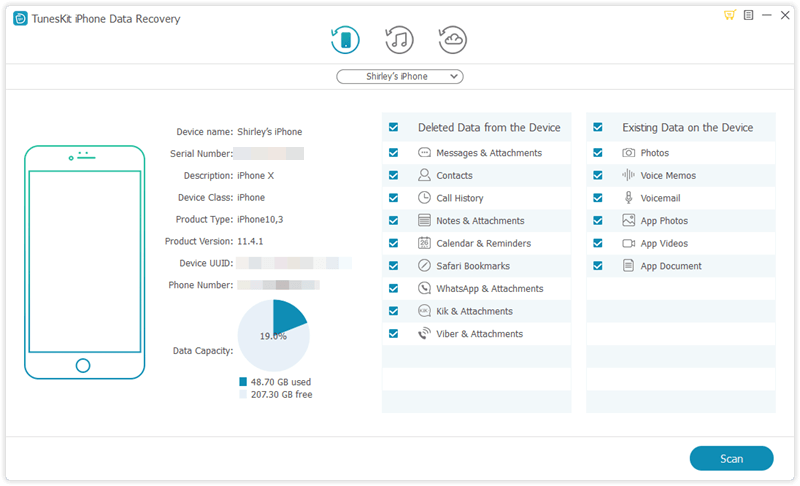
Launch TunesKit iPhone Data Recovery on your computer and connect your locked iPhone to the computer via a USB cable. After that, select "Recover from iOS" option on the top menu bar.
connect iphone
Note: Please use the computer that you've once connected your iPhone to and trusted before, so it won't ask you to Turst This Computer on your device and thus bypass the passcode.

Step 2 Scan and Preview

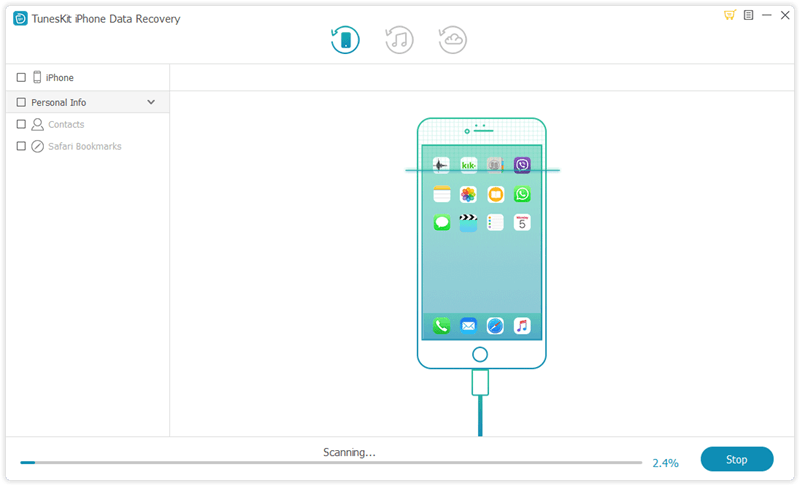
Select the categories you would like to recover on the interface. Then Click the "Scan" button and wait the scanning process for just a few minutes.
scan iphone

Step 3 Select and Recover

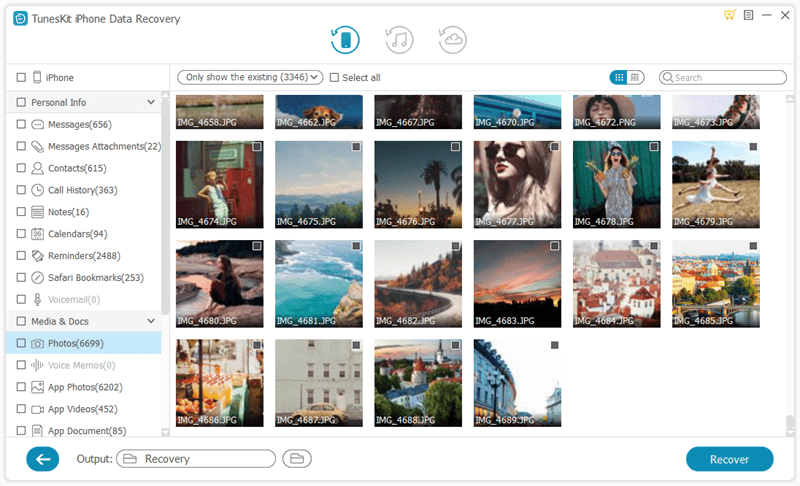
You can preview all recoverable files as shown above. Next select the files you intend to retrieve and click "Recover" button. Soon after that you will find those data back on your computer.
recover data on iphone

Part 2 Recover Data from Locked iPhone with iTunes Backup

Option 1. Recover Locked iPhone Data from iTunes

Moreover, it is more convenient if you have a backup on your locked iPhone as you can restore data from it directly. If not, you are also able to make it following 3 steps below.
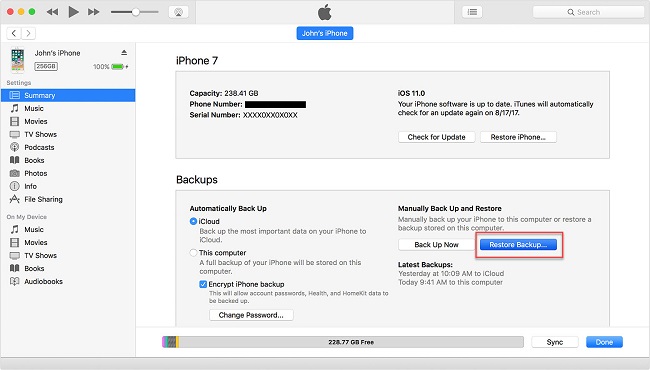
restore backup from itunes

Step 1 Backup your locked iPhone using iTunes

There is no need to enter password to backup if you made a backup previously and did not restart your iPhone after connecting it to iTunes last time. Therefore, things become easy to solve, what you need to do is back up your locked iPhone as always. Just connect your iPhone to the computer and Launch iTunes.

Step 2 Efface your iPhone

Then you can start erasing your iPhone after you finish backing up the data on the locked iPhone.

Step 3 Recover the backup files to iPhone

Now that your iPhone is unlocked, however, there is completely no data on the device. To restore data to the iPhone, click the "Summary" option on navigation pane on the left side, and choose "Restore Backup..." option.

Option 2. Recover Locked iPhone Data via TunesKit iTunes Recovery Mode

Of course, you can try TunesKit iPhone Data Recovery, which is recommended because it is able to recover data from the backup to your iPhone efficiently and selectively. The specific steps are as follows.

Step 1Select iTunes backup file

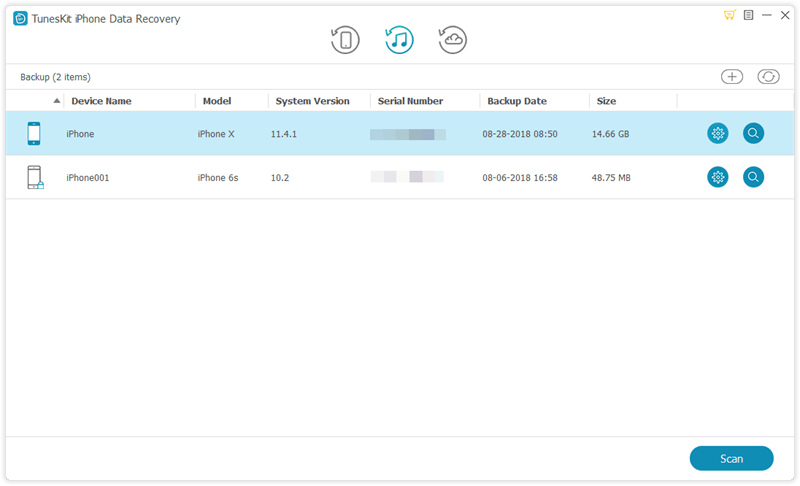
Begin by launching TunesKit iPhone Data Recovery and select 'Recover from iTunes Backup' from the main menu, then the application will start detecting all the available iTunes backup files on your computer.
select itunes backup

Step 2Start scanning lost files

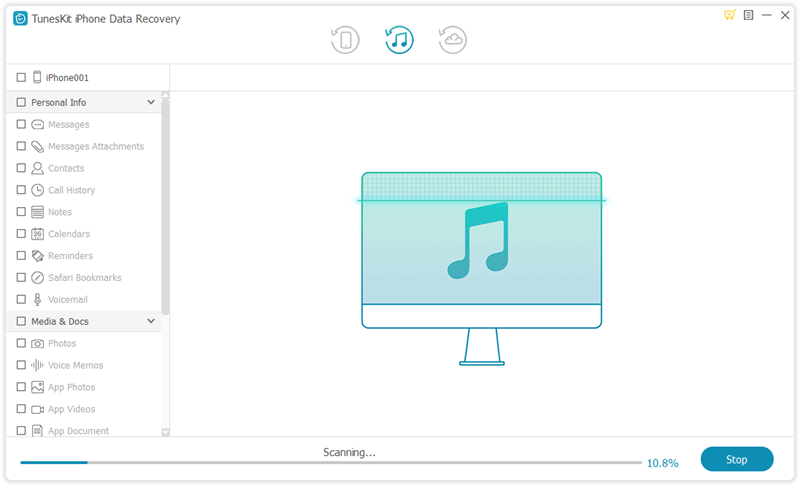
Select the type of data you want to restore and click 'Scan'. Then you need to wait until the extracting process finished.
recover iphone data from itunes

Step 3Preview and recover

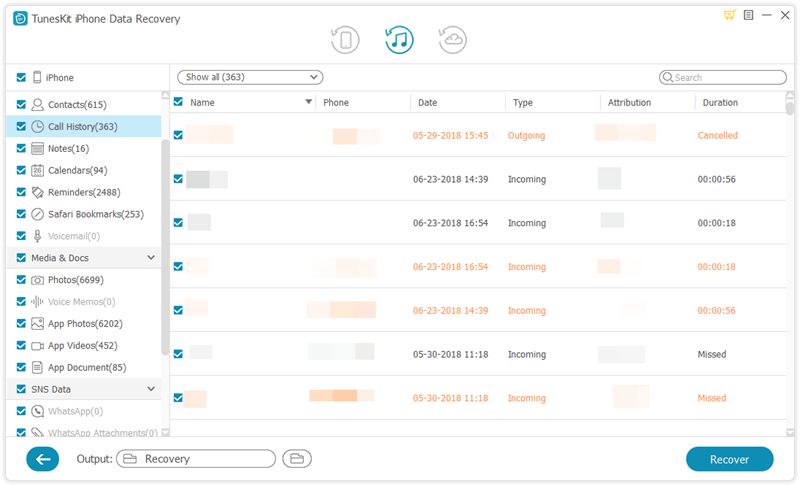
Now you can view all recoverable files since all available data display on the interface. Select the data you want to restore and click "Recover" to retrieve it to your computer.
recover iphone data from itunes

Part 3 Recover Data from Locked iPhone with iCloud Backup

Option 1. Reset Locked iPhone and Recover Data from iCloud

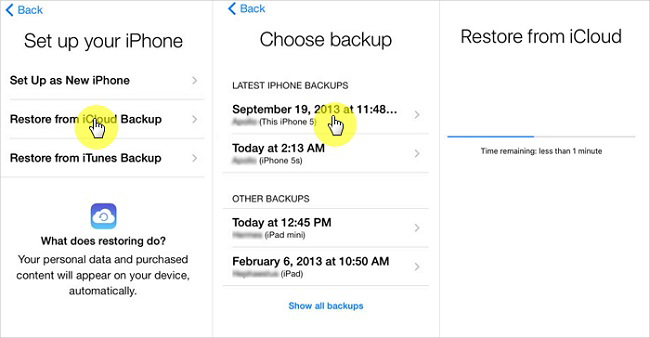
As long as you have iCloud backup, you can first remove your locked passcode through iCloud remotely and then restore it from the iCloud backup file. The following is the quick guide.
Step 1. Go to visit the official website (www.iCloud.com) on the browser of your computer or iPad and then enter the Apple ID and password to sign into your iCloud account.
Step 2. Click on 'All Devices' button and then choose the locked iPhone you want to erase.
Step 3. Press on the 'Erase iPhone' option and all the data will be gone, as do the screen password. Next restore your iPhone from iCloud backup as instruction on the screen.
recover data from icloud backup

Option 2. Recover Locked iPhone Data via TunesKit iCloud Recovery Mode

Since you've backed up your data to iCloud, you can also use TunesKit iPhone Data Recovery to recover data from locked iPhone effectively. You don't even have to use your locked/disabled iPhone during the recovery process. Now just follow the simple step-by-step tutorial below to learn how to do it.

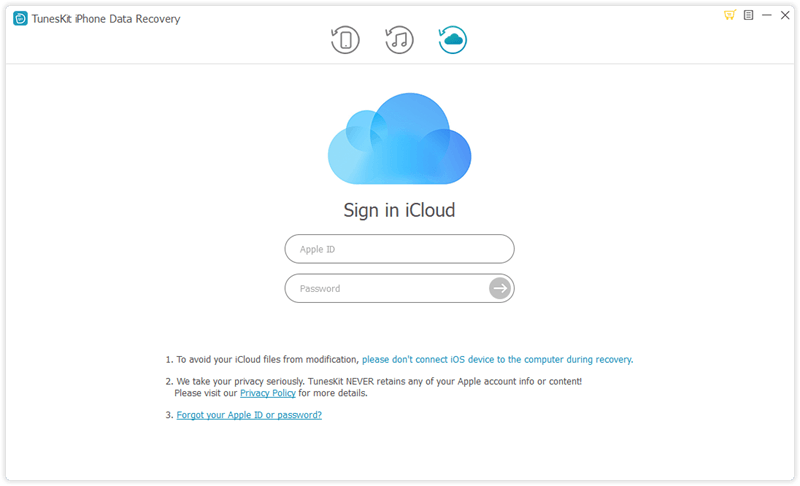
Step 1Sign into iCloud account

Launch TunesKit iPhone Data Recovery on the PC and pick the "Recover from iCloud Backup" mode this time. Log into your iCloud account with correct Apple ID and passcode.
sign in icloud

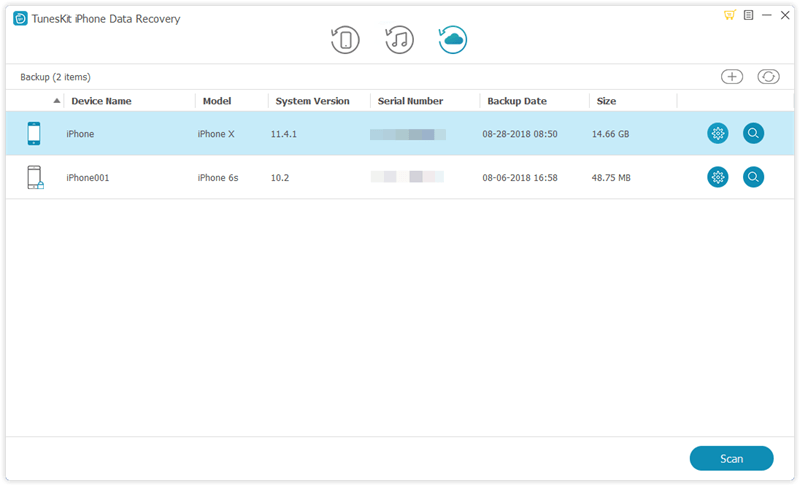
Step 2Extract iCloud backup file

Once you entered the iCloud account successfully, you'll see all your iCloud backup files in a list. Choose the right one that may contain your lost data and then click the 'Download' button.
download icloud backup

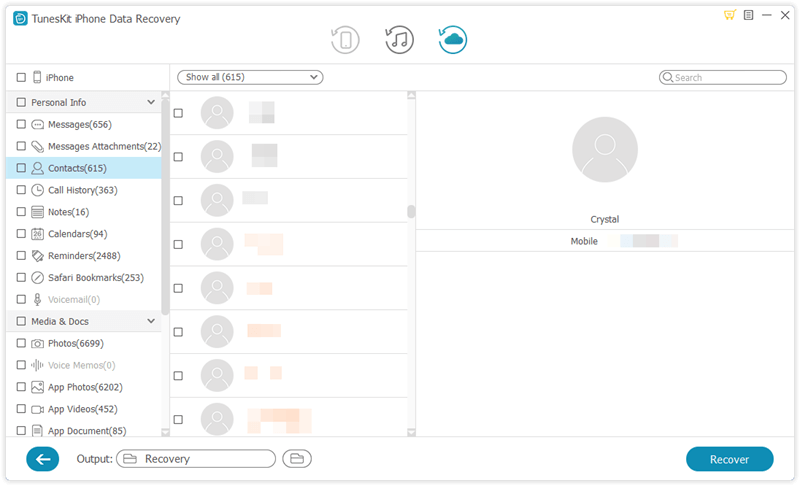
Step 3Retrieve data from iCloud backup

After the download ends, all files will be shown in categories on the left. You can now preview them one by one and tick the ones you want to restore. Afterwards, click the 'Recover' button to get them back immediately.
recover iphone data from icloud backup

Conclusion


As it is shown from the above, you can use TunesKit iPhone Data Recovery to restore data from your locked iPhone whether you have a backup on it or not. In fact, TunesKit is capable of rescuing your data no matter how you lost it, for example, iOS upgrade failure, jailbreak error, improper operation, device damage or lost, factory reset, virus attack, screen broken, system crash, etc. Try this software when you are in the need of recovering lost data.

Source: https://www.tuneskit.com/iphone-recovery/recover-data-from-locked-iphone.html

You may also like:


Jul 12, 2019

[2019 Review] Top 10 iOS Data Recovery Tools


Q: "I've tried to update my iPhone software to iOS 13 but it failed during the process, and I lost all my data! I heard some iOS data recovery programs can help you get my photos, contacts and other data back, but there are so many such software in the Internet. How can i pick a useful one?" - Jack from Apple Discussion

Like Jack, most of us may encouter such data loss in our life. Actually it's not an easy thing to get a suitable iOS data recovery software from hundreds of similar programs. After done some survey and tests, we have collected top 10 best iOS data recovery tools in 2019, with pros and cons provided for your reference. Next let's start.

1. TunesKit iPhone Data Recovery

TunesKit iPhone Data Recovery is very credible data recovery software that will recover a vast range of lost data files and will carry out this operation very fast. It has a preview function and will allow you to select the file types that you want to be recovered. It is prided as the best iPhone data recovery software 2019 in terms of efficiency and speeds in executing the recovery process. It also recovers files of large sizes. It recovers lost data in three ways, namely, recover from the device, recover from iTunes backup and recover from iCloud backup.
tuneskit ios data recovery
Pros
  • Fast data recovery speed.
  • Supports various data loss cases.
  • Recovers over 20 file types of different formats.
Cons
  • Trial version does not allow saving of the recovered files

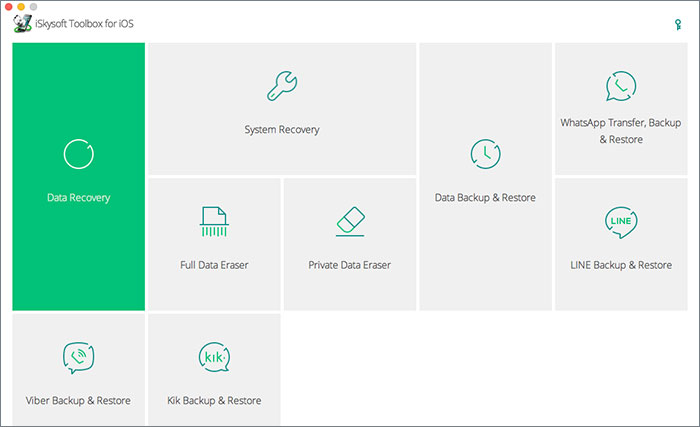
2. iSkysoft Toolbox for iOS

This is among the best iOS data recovery software that will recover your lost files very quickly. It executes its recovery protocol in three ways, which are recovery from iOS device, recovery from iCloud backup storage and recovery from iTunes backup files. Its operation format makes it possible to recover over 20 file types from calendars, notes, and images among many others.
iskysoft iphone data recovery
Pros
  • Recovers a vast range of file types.
  • Easy to use software.
  • Compatible with older iOS devices.
Cons
  • It is very expensive on purchase.

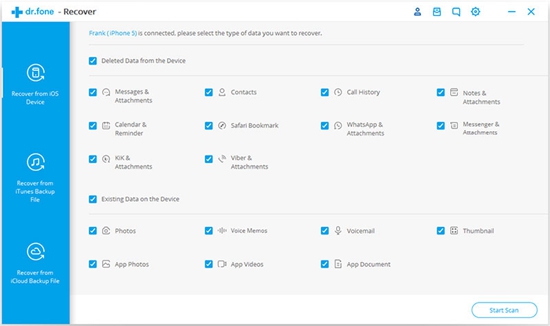
3. Dr.fone - Recover

This is top-ranked software in iOS data recovery and it prides itself in the aspects of speed, efficiency, and proficiency. Dr.fone - Recover has a high rate in recovery of lost files and operates in three intricate steps in the path to recover your data. These three steps are the connection of your device, scanning, and preview of data and finally the recovery of your data. This simplicity in operation has earned it lots of applauses on clients who have used its services.
drfone ios recovery software
Pros
  • Very fast in data recovery.
  • Simplicity in operation.
  • Easy to understand its operation module.
Cons
  • Relatively expensive on purchase.

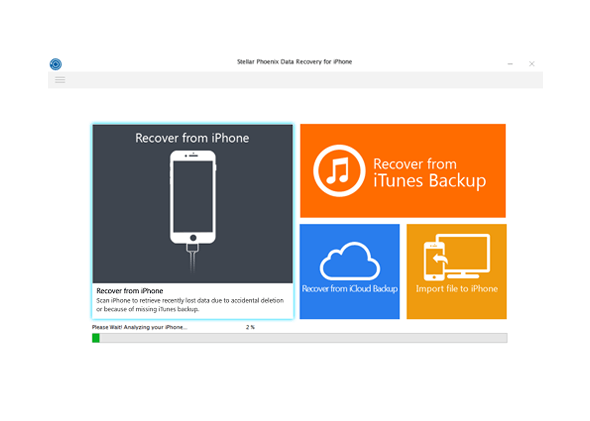
4. Stellar Data Recovery for iPhone

It is awesome software that will recover lost data for all iOS devices including the earlier versions such as iPhone 4 and iPhone 4s. It does not require technical expertise to operate and is very efficient in its data recovery process. Another superb feature of this iOS recovery software is the selective recovery feature that will let you have a preview of the lost data and select the files which you want to be recovered.
stellar iphone data recovery
Pros
  • Gives a preview of files to be recovered.
  • It is able to recover large files.
  • Compatible with older iOS devices.
Cons
  • Slow and time-consuming scanning process.

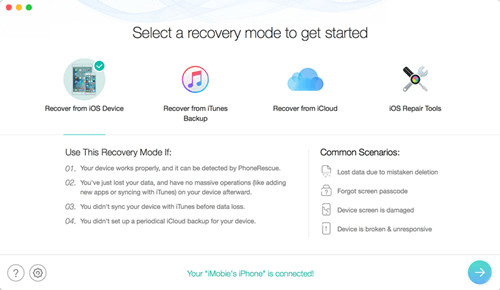
5. iMobie PhoneRescue for iOS

This is another notable recovery application for iOS devices that is rated highly by its previous users on the parameters of efficiency and speeds in operation. Its recovery process is straightforward and you can select to either recover from the device, the iTunes backup or the iCloud backup.
phonerescue for ios data recovery
Pros
  • Supports over 31 file types.
  • Safe recovery mode that will prevent the recovery of malicious files.
  • Offers three modes of recovery that are efficient to restore your data.
Cons
  • The free edition is limited when it comes to features.

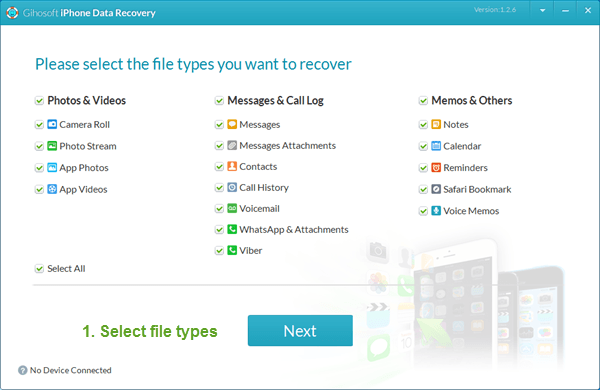
6. Gihosoft iPhone Data Recovery

This software can be considered as the best free iOS data recovery software in 2019. This software will recover up to 16 types of data from iPhone in a very quick and effective way. It will recover your lost data courtesy of incidences like a locked phone, accidental deletion of data or even damage to your device. It sums up all its great features with its cost free aspect that is a deal not to be overlooked.
gihosoft iphone data recovery
Pros
  • Recovers up to 16+ types of data files.
  • Supports al iOS devices both new and old versions.
  • Recovers from the device, the iCloud backup, and the iTunes backup.
Cons
  • Its pro version with more lucrative features is not free on download.

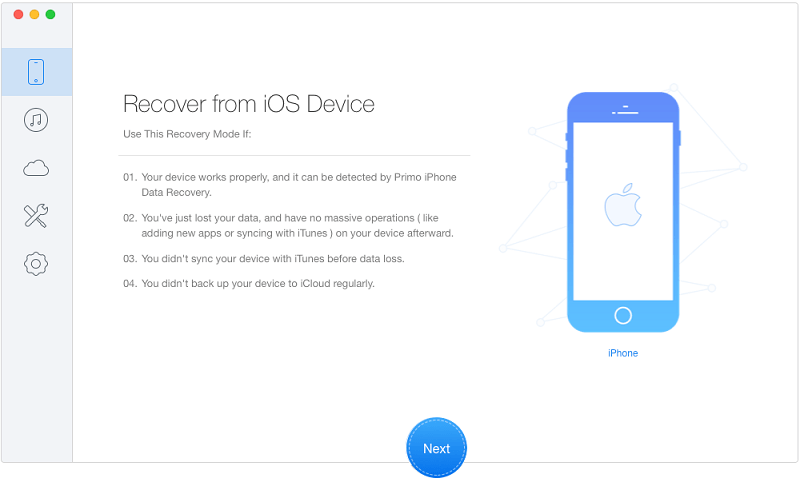
7. Primo iPhone Data Recovery

This is superb software that will recover your lost data from your device with an easy to navigate interface. Its operation does not require any technical skills and will execute your recovery relatively fast. Apart from the recovery of your files, this software will also fix issues such an upgrade error on your device.
primo iphone data recovery
Pros
  • User-friendly interface that is very easy to comprehend and use.
  • Provides selective recovery of your lost data.
  • Has a feature that will fix issues such as upgrade errors or hanging device.
Cons
  • Its trial version does not allow for the saving of the recovered data.

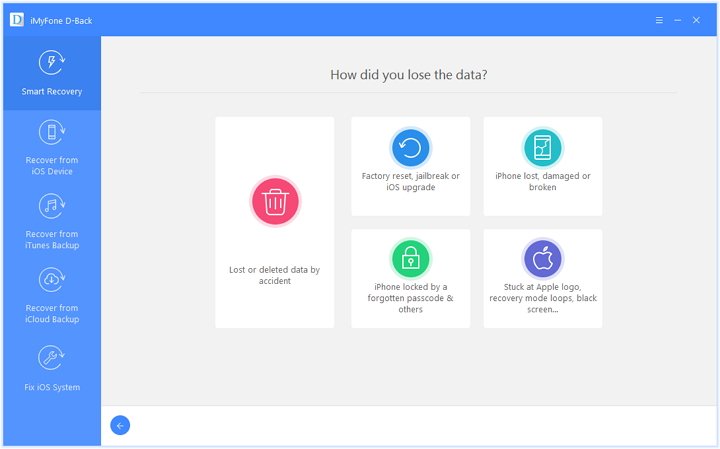
8. iMyFone D-Back

This is a very superb recovery partner for your iPad and comes with awesome features such as quick recovery speeds and selective recovery. With the easy to navigate user-interface that does not need any technical background, this is the to-go software for your recovery needs.
imyfone d-back ios data recovery
Pros
  • Recovers large files.
  • Prevents the recovery of malicious data that may contain viruses.
  • Has a preview that will let you choose the files that you want to be recovered.
Cons
  • The trial version has limited features.

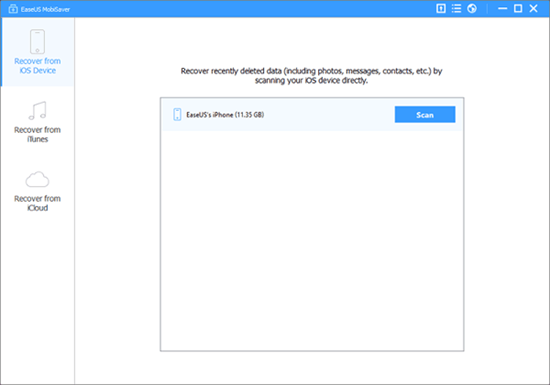
9. EaseUS MobiSaver

EaseUS MobiSaver is very efficient iOS data recovery software that will let you recover your lost files very fast. It has an easy to use interface that promotes easy navigation. It also provides a clear step by step guide on the execution of this process.
easeus iphone data recovery
Pros
  • An easy to understand interface that also provides a guide for your best experience.
  • Fast data scanning and recovery process.
  • Recovers data from the device, the iCloud backup, and the iTunes backup.
Cons
  • Bound to have some connectivity issues.

10. Joyoshare iPhone Data Recovery

Joyoshare iPhone Data Recovery is a very smart and easy to use iOS data recovery software for both Mac and Windows users. You can use it to easily recover data via iTunes backup, icloud and iOS. By adopting some special unknown technologies, Joyoshare works much faster than other similar iphone data recovery tools.
joyoshare ios data recovery
Pros
  • Incredible fast working speed.
  • Easy to use interface make you handle easily.
  • Support a vast range of data type for recovery.

Cons
  • Lack of some iOS version support to use iCloud recovery mode.

Hope this review is helpful to you. Any more solutions or suggestions, please feel free to leave your voice below.

Source: https://www.tuneskit.com/iphone-recovery/2019-best-ios-recovery-software.html

Jul 4, 2019

Microsoft Ebook Is Closing: What about the Books You Bought?

Microsoft is going to shut off its ebook services in this July after trying hard to enter the electronic book market since 2000. So what about the ebooks that you purchased at Microsoft's online store? Are they still available? Now read this news and learn more about it.

Customers were warned in April that their ebooks would disappear from the Microsoft Store and that they would no longer be able to buy, rent or pre-order them. They were also told that they would continue to receive access to purchases until July, when refunds would begin to roll out.

Any ebooks that were downloaded for free have subsequently been removed from users’ libraries and customers who purchased titles through the Microsoft Store are being offered refunds.

£20/$25 in credit is also being handed out to users that scrawled highlights or notes in their copies, as these cannot be recovered either.

Microsoft actually teamed up with US retailer Barnes & Noble to launch its first ebook reader – Microsoft Reader – and the LIT file format in 2000, about seven years before Amazon released the Kindle and pretty much took over the industry.

The original Microsoft Reader and LIT format lasted until 2012 when it closed and was re-released a year later as an application to read PDF, XPS and TIFF documents in.

Microsoft also entered into a second partnership with Barnes & Noble in 2012, investing $300 million in the company’s Nook e-readers. The deal lasted only two years before Barnes & Noble bought out Microsoft in 2014 for less than half of Nook’s original value.

This latest service launched on web browsers in 2017 in an effort to make Microsoft’s Surface computers a popular choice for consuming ebooks on the go but, ultimately, the reader could not drum up the audience the company needed to keep it going.

Digital rights management tools mean that when you purchase most ebooks you don’t actually own them. What you are buying is a license that can expire at any moment, keeping Microsoft and other ebook retailers in control of your digital library.

Though DRM tools do help to protect copyrighted works from being stolen, Microsoft’s closure certainly serves as a reminder of what you are paying for when you open your favourite ebook retailer’s website.

Note: If you're a ebook lover and you once read a lot of books from Microsoft store, but now you don't know where to find interesting ebook to read, you may turn to Aubile.com by Amazon. It provides users every audiobooks from every passion from entertainment, education, fiction to inspiration. If you want to download all your audible audiobook and listen to them on any device on the go, you can then try TunesKit Audible Converter, which can remove the DRM protection of every audible audiobook you've bought.

From: https://www.trustedreviews.com/news/ebooks-purchased-microsofts-online-store-vanishing-peoples-libraries-3894074

Jun 13, 2019

Apple MacOS Catalina: What's New?


What's New in macOS Catalina
Every year at WWDC, we get a look at what’s coming to the next version of Apple’s macOS desktop operating system. In the past, we’ve had big updates like Leopard and less-ambitious ones like Snow Leopard. This time, Apple abandoned its naming convention, moving from the (Mojave) desert to the California coast of Catalina.
The island update is less extensive than its predecessor, but there are some welcome changes on tap. Maybe more important than any new features are developer tools Apple is releasing in order to make converting iOS apps to Mac apps a cinch. At WWDC 2019, Apple showed versions of GameLoft’s Asphalt 9 Ledgends and Atlassian Jira ported from their respective iOS versions, with all the desktop options like keyboard shortcuts and drag-and-drop included.

Photos App Redesigned

As on iOS, the Mac Photos app has been redesigned with a new home screen, video autoplay, and new organization of views that bring out the best by Day, Month, and Year. The update also removes duplicates and clutter such as screenshots, and uses AI to determine your best shots and important events like birthdays and trips.
Find My . (Photo by Justin Sullivan/Getty Images)

Find My

The very useful Find Friends and Find My iPhone apps are now joined into a single Find My app. A new benefit will be that you can find a device even if it’s offline, based on Wi-Fi and Bluetooth signals. Apple states that the info used to locate the device is anonymous and encrypted end-to-end. Nothing new about the Find My Friend part of the app was shown at WWDC, but it’s a great utility. (Photo by Justin Sullivan/Getty Images)

Sidecar

This capability had been possible through third-party apps, but it’s never worked as seamlessly. Sidecar lets you use your iPad as an external monitor and use an Apple Pencil for markup and drawing. It also adds a Touch Bar to Macs that don’t have one. Sidecar works either wired or wireless, and in either extended or mirrored desktop views. Compatible sidecar apps for drawing include Adobe Illustrator, CorelDRAW, Cinema 4D, and ZBrush.

No More iTunes

At WWDC, Apple’s Craig Federighi joked that people wanted more functions in iTunes, while in truth the media application has long been criticized for its feature bloat. With Catalina, Apple cuts the cord, completely removing iTunes as a standalone app. Instead, all its music functions will be covered by the Music app and all its video apps by the Apple TV app. Podcasts gets its own app, just as it has on iOS, but the new Mac app will be able to index spoken words in podcasts to help in searching.

Screen Time

This is another feature that makes the move from iOS to the Mac with Catalina. Having Screen Time on all your devices will enable a full picture of your tech use. Set communication limits for offspring, schedule offline time, and see which apps and websites are occupying you and your family. A a new “One more minute” feature lets you add work time to finish up before breaks, and Family Sharing offers new child monitoring options.

Notes App

Notes has a new gallery view, shared folders, and more powerful search. The latter means you can now search for text in scanned documents and objects in photos. It also suggests search terms as soon as you click into the search box. New checklist options let you reorder items with drag and drop, and reuse old checklists.

Safari Updates

Apple’s default web browser has a new start page with suggested content based on your browsing history and even links from Messages. The browser now warns you about weak passwords, and lets you switch to picture-in-picture view from the tab audio button.

Accessibility and Voice Control

Voice control of computers has been around for over a decade, but with Catalina, Apple beefs it up with Siri AI smarts in the new Voice Control app. It works for both computer control and voice dictation, and offers a Hover Text zoomed-in window for easier text input. You can add custom words, or see suggested words or emoji.


Also Check: 

Jun 2, 2019

Apple WWDC 2019: What to Expect

On Monday, Apple Inc.'s will start its opening keynotes for the 2019 Worldwide Developers Conference (WWDC) in San Jose, when the company will show off its new iOS version, as well as other systems such as MacOS, WatchOS, TVOS. What else can expect at this annual big event? Well, let's read on to find out more.

Software updates

Apple usually shows of the next generation of iOS, its operating system for the iPhone, iPad and iPod Touch. The next version is iOS 13, and is expected to include a dark mode, according to 9 to 5 Mac. The mode changes the color scheme of a screen so that it's easier to see in low light. Apple already has a dark mode available on its Macs. Other changes could include updates for its built-in apps like Reminders, new health-tracking features like a hearing-measurement tool, and more multitasking features on the iPad.

Read more: What's New in iOS 13?

An end to iTunes

After 18 years, Apple could finally take its main application for all music and video content out of commission, according to Bloomberg. The decision would not be a big surprise. The groundwork has already been laid, with Apple breaking music into its own app and investing heavily in content and partnerships for a revamped TV app.

Apple Watch breaks free

The four-year-old Apple Watch has always been somewhat dependent on the iPhone for key tasks. This year, Apple could give the wearable more independence with an App Store all its own, as well as updates to key apps and new ones for health-tasks like period tracking.

A possible Mac Pro

While WWDC is focused on software, Apple has been known to tack on some hardware announcements. Nothing iPhone related — those are saved for the big fall event — but Apple could finally unveil an update to its Mac Pro, along with a new Apple display. The company has been promising a new model of the powerful PC since 2017, after a lukewarm reception for its cylindrical "trash can" Mac Pro in 2013.

The event will start at 10am PT/1pm ET on Monday, June 3, and ended on Friday, June 7, 2019 and it will be streamed on Apple's site.

Source: https://www.cnn.com/2019/06/01/tech/apple-wwdc-2019-preview/index.html

May 27, 2019

Apple Unveils New MacBook Pro - the Fastest Mac Notebook Ever

Recently, Apple has introduced its new MacBook Pro with faster 8th- and 9th-generation Intel Core processors, bringing eight cores to MacBook Pro for the first time. MacBook Pro now delivers two times faster performance than a quad-core MacBook Pro and 40 percent more performance than a 6-core MacBook Pro, making it the fastest Mac notebook ever.

These new processors, combined with powerful graphics, the brilliant and colorful Retina display, super-fast SSDs, the Apple T2 Security Chip, all-day battery life and macOS, make MacBook Pro the world's best pro notebook.


"Whether it's college students mastering a course of study, developers building world-class apps or video editors creating feature films, we’re constantly amazed at what our customers do with their MacBook Pro,” said Tom Boger, Apple’s senior director of Mac Product Marketing. “Now with 8-core processors for an incredible performance boost, along with its stunning Retina display, fast storage, all-day battery life and running macOS, MacBook Pro continues to be the world’s best pro notebook and we can’t wait to get it into our customer’s hands to see what they do next."

When compared to the fastest quad-core 15-inch MacBook Pro, the new MacBook Pro with 8-core processors is up to two times faster, so:


  • Music producers can play back massive multi-track projects with up to two times more Alchemy plug-ins in Logic Pro X.
  • 3D designers can render scenes up to two times faster in Maya Arnold.
  • Photographers can apply complex edits and filters up to 75 percent faster in Photoshop.
  • Developers can compile code up to 65 percent faster in Xcode.
  • Scientists and researchers can compute complex fluid dynamics simulations up to 50 percent faster in TetrUSS.
  • Video editors can edit up to 11 simultaneous multicam streams of 4K video in Final Cut Pro X.

Compatibility

All new Macs come with macOS Mojave, the latest version of the Apple's desktop operating system, with features inspired by pros but designed for everyone. In Mojave, Dark Mode transforms the desktop with a dramatic new look that puts the focus on user content, Stacks organizes messy desktops by automatically stacking files into neat groups and FaceTime supports group calling. Mojave also brings iOS apps, including News, Stocks, Voice Memos and Home to the Mac and features a redesigned Mac App Store with rich editorial content and the addition of apps from top developers, including Microsoft and Adobe.

Pricing and Availability

Starting at $1,799 and $2,399 respectively, the updated 13-inch MacBook Pro with Touch Bar and 15-inch MacBook Pro are available from the release day (May 21, 2019) through apple.com, the Apple Store app and in select Apple Stores and Apple Authorized Resellers later this week.

Source: https://www.apple.com/newsroom/2019/05/apple-introduces-first-8-core-macbook-pro-the-fastest-mac-notebook-ever/

May 15, 2019

Top 10 Best Spotify Podcasts in 2019

Since its inception in 2008, Spotify has grown to become one of the most popular digital audio streaming services in the world. Today, you can access Spotify from over 60 countries across the globe. It has over 200 million users, making the no.1 audio streaming platform.
Notably, over the last three years, Spotify has been increasingly venturing into the podcasting world. In fact, plans are underway to update its application interface to facilitate easy access to podcasts by its users. The latest acquisition of Gimlet Media goes to show how sincere Spotify is in the quest to develop the podcasts platform for its fans.
top 10 spotify podcasts

As these efforts intensify, we are going to look at what Spotify has achieved as far as podcasting is concerned. This article will in great details attempt to establish the best Spotify podcasts of 2019. Am not sure what your best Spotify podcasts this year is, but for me there are a couple great podcasts that I have grown to love. Well, let’s find out the top 10 best podcasts on Spotify in 2019. The countdown starts!

1. Showstopper

Hosted by the chief editor for ‘The Fader’, Naomi Zeichner, showstopper is an original Spotify podcast that attempts to shed light on the use of memorable music in TV shows. The content of the work is significantly dominated by interviews with a whole range of artists, music supervisors and production staff, as well as show runners involved creation of classic and iconic music. Showstopper episodes usually run for about 20 or so minutes. A new episode is released after every two weeks. Just make sure you do not miss out on inspirational interviews with Naomi.

2. The Joe Budden Podcast with Rory and Mal

The show is popularly known for a number of controversial public feuds ‘beef’ with renowned artists such as Eminem, Complex, Pusha T, Chance The Rapper to mention a few. Old school former rapper, Joe Budden has hosted the show since its inception in February 2015. Initially, the show was called “I’ll Name This Podcast Later,” It has since then grown to be one of the most followed podcast on Spotify. Last year, Joe and his co-host signed a deal that gave exclusive airing rights to Spotify. This means that is only on Spotify that can catch the latest episodes of ‘The Joe Budden Podcast’. The episodes air twice a week.

3. Dissect

Like showstopper, Dissect is also a music-oriented podcast on sporty and equally one of the best Spotify podcasts 2019. However, things are done a little differently in comparison with showstopper. They profoundly look at one album per season and each track form one episode. For example, season one expounded on “To Pimp a Butterfly” on Kendrick Lamar. Subsequently, Season 2 looked at “My Beautiful Dark Twisted Fantasy” by Kanye West.

4. Microphone Check

The particular podcast is significantly tailored towards establishing the current dynamics of both music and culture. This makes it one of the best on Spotify podcasts. More specifically, the Microphone Check podcast focuses on the interactions between hip hop music and the outside world. The podcast is chat-based. The show is co-hosted by Frannie Kelley (a journalist) and Ali Shaheed Muhammad (a founding member of Quest community); they interview different guests every week. The podcast does not have a fixed airing schedule. Sometimes it might be a week or even one month to view the next episode.

5. Fest and Flauschig

It is undeniably one of the most popular German-language podcast. It is so popular that even non- German speakers love watching it. Last year, the show featured as the topmost listened podcast on Spotify. We will probably see a repeat of the situation this year. In the off chance it happens, then Fest and Flauschig will be the best Spotify podcasts 2019. Comedians Jan Böhmermann and Olli Schulz host the show.

6. MotoGP Podcast

It is the podcast to watch especially if you are a Motosport fan. The podcast came along after collaboration works between Spotify Studios and Dorna Sports. In fact, the series started off the years and seen an incredible following. Currently, they have an ongoing interview with legendary racer Casey Stoner.

7. Are and Be

It is simply an R&B podcast. Two seasons have already been released in 2017 and 2018. The 2019 season is just around the corner. So much anticipation is building up. Are and Be podcast is managed by Spotify’s Global Head of R&B and Soul.Currently, it serves as a platform where R&B artists share their experience stories. Usually, every episode goes for around thirty minutes.

8. David’s Out For A Good Time

This Spotify original podcast targets the LGBTQ community across the globe. David Olshanetsky, the TheShitneySpears.com founder host the show. Apart from discussing issues touching on the LGBTQ community, the show also sheds light on matters relating to the internet, pop culture among others. New episodes are available every Tuesday. If you can access one, then it means that they are on a break like they often do.

9. Under Cover

The podcast feature artists who have done cover versions of popular songs across the globe. Cover songs artists are invited to the show to share their stories relating to the creation and production of the covers songs. The show has brought on artists such as Shawn Mendes and Meghan Trainor where they discussed their cover songs “Use Somebody,” and “Normal,” respectively.

10. Amy Schumer presents: 3 Girls, 1 Keith

The show first aired on Spotify on June 2018 courtesy of Amy Schumer, an American stand-up comedian. The show is co-hosted by other three comedians Rachel Feinstein, Keith Robinson, and Bridget Everett. The show is mainly dominated by a whole range of topics from sex, to love, and politics among others. They also go further to gossip about themselves making the show very lively and exciting. So far they have two series, and a third is expected to air soon.

The Final Words


All you need now is to create an account with Spotify and get to enjoy the best Spotify podcasts of 2019 at the comfort of your room. If you are using the paid account of Spotify, you can easily download the podcasts onto mobile devices and enjoy them on the go. If you are free user but also want to listen to Spotify podcasts offline on any device, you should use TunesKit Spotify Music Converter, a 3rd-party Spotify downloading tool that can save and encode Spotify podcasts to offline MP3 or other common formats with the original ID tags preserved.

Source: https://www.tuneskit.com/spotify-music-tips/best-spotify-podcasts.html

Dec 5, 2018

Complete Guide to Cancel Audible Subscription

Where can you ask Jeremy Irons, Jake Gyllenhaal, Bryan Cranston, and Kate Winslet to whisper in your ear? Amazon's Audible is the world's largest seller of audiobooks. Is that making you think twice about cancelling your Audible subscription? Even then, let's see how to cancel an Audible subscription in a few easy steps.

If you are an audiobook lover, then”Is Audible worth it?” is a legitimate question. You also might have your own genuine reason to cancel your Audible account. Is it any of the ones below?

Reasons for Cancelling an Audible Subscription


Audible has a lot of pros for audiobook lovers. But there could be a few personal negatives for you too. One of them might be your main reason.
  • The Audible monthly subscription is too high for the single monthly credit.
  • You dislike Audible’s recommendation system as it does not surface the titles you need.
  • The reason for using the app has changed: For instance, you drove a lot earlier and now you don’t.
  • You comprehend more when you read rather than listen.
  • There are cheaper alternatives to Audible audiobooks.
Your reason might not be on the above shortlist, but Audible makes it easy to cancel a subscription in a few clicks.

How to Cancel an Audible Subscription


With your reason decided, you can set out to cancel your Audible subscription. We will look at the simple step-by-step process first and then get into a few more guidelines that you should be aware of.

Step 1. Log into the Audible desktop site. You cannot cancel a subscription from the Audible phone or tablet app.

Step 2. Click on the dropdown arrow next to your name and select Account Details.


Step 3. Click Cancel membership at the bottom of the “View membership details” section.


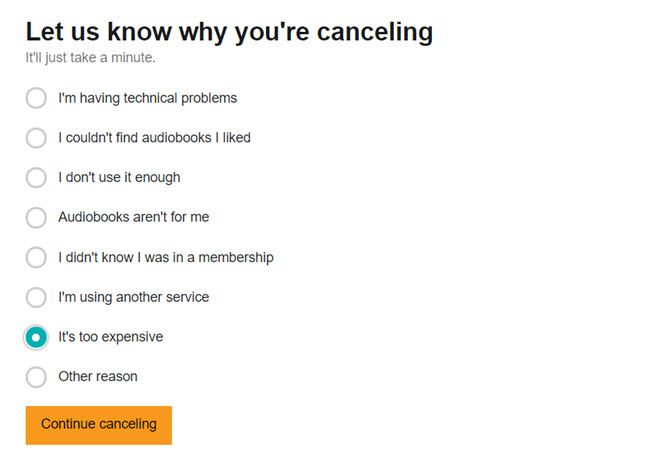
Step 4. In the next screen, Audible asks you for a feedback on the reasons for the cancellation. Explain your reasons and click the Cancel Membership button.


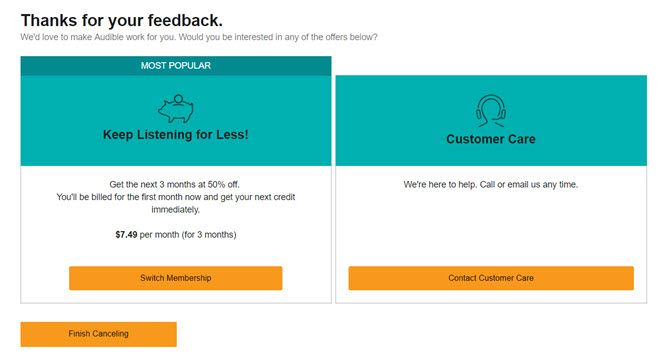
Step 5. Depending on your location and reasons for cancellation, Amazon might offer you an alternative. For instance, it might suggest a pre-paid membership plan instead of a recurring plan. It can also offer you a “special” plan in an effort to indude you to stay on. Continue the cancellation steps if you are not interested in the service.


Step 6. Sign again into Amazon Audible to confirm your cancellation. After you cancel, an automated email will be sent to you as proof of your cancellation.

Before You Cancel Your Audible Subscription


Before you hit the orange cancel button, read through these points. Amazon also highlights them on its Help page.
  • You can cancel the monthly recurring plan only. Prepaid plans cannot be cancelled as they will just expire.
  • Cancel your membership from the desktop site. Audible does not allow you to cancel any plans from the mobile apps. But you can use the desktop versions in Chrome and Safari to access the site and go through the process.
  • Unused credits are also cancelled with the subscription. Make sure to use them before you cancel. You cannot transfer them to anyone else.
  • Keep listening to your audiobook collection. You retain the use of your old audiobook library and can download them again.
  • Cancel before the next billing cycle. Manage all your online subscriptions and cancel it before the next payment cycle starts. Also, cancel your subscription if you are in the trial period if you do not want to be billed when the trial ends.
  • You can still purchase Audible books. But you won’t be able to take advantage of special discounts, deals, and special Audible features like an audiobook exchange or returns.
Source: https://www.makeuseof.com/tag/how-to-cancel-audible/

More Audible Tips You May Like: