Nov 1, 2019

How to Download Music from Pandora - 2 Best Ways

pandora music station

Pandora is a music streaming and  music recommendation service that can be accessed through a web browser or mobile app. It offers 3 subscription plans for its users. The first option is a free trial, with which users can only listen to the free Pandora music radio online but cannot download it. The other two allow users download music from Pandora but somehow have other limits too. Therefore, we now provide you with best method to download Pandora Radio.

Method 1. Download Music from Pandora with TunesKit Audio Capture

Due to the limit of the subscription plans, a third-party tool would make downloading from Pandora a lot easier. TunesKit Audio Capture, a professional Pandora downloader and recorder that can easily download and convert any Pandora playlist in lossless high quality, and save them in common audio formats like MP3, AAC, WAV, FLAC, etc.
  • Download and record an unlimited number of Pandora music radios
  • Convert Pandora music to MP3, AAC, WAV, FLAC, M4A, M4B
  • Retain the original audio quality and ID3 tags
  • Support multi-track recording, audio cutting and mixing
  • Capture sound from any programs on your computer

Steps to Record and Download Pandora with TunesKit Audio Capture

Step 1. Launch TunesKit Audio Capture

set capture preferences
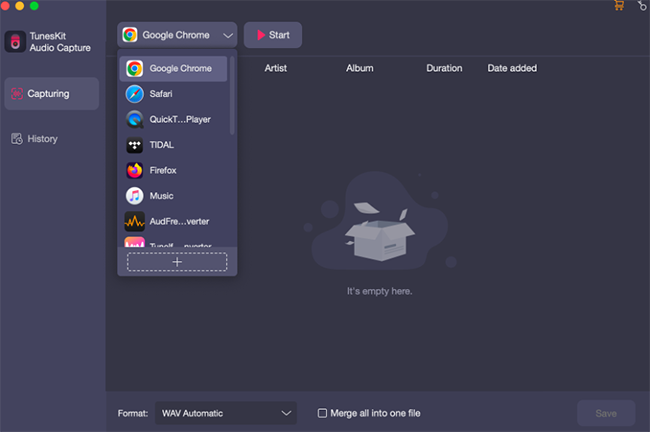
After launching TunesKit Audio Capture, you'll be prompted with a window where a list of programs displayed. You can add new programs by clicking the "+" button. Make sure the web browser you open Pandora with is added to the list. Next, click the "format" icon at right bottom to set the output format.
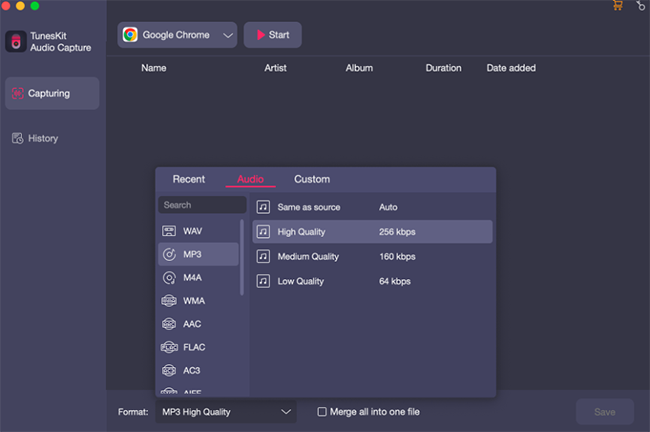
set output format

Step 2. Start to record and download Pandora music

tuneskit streaming audio capture
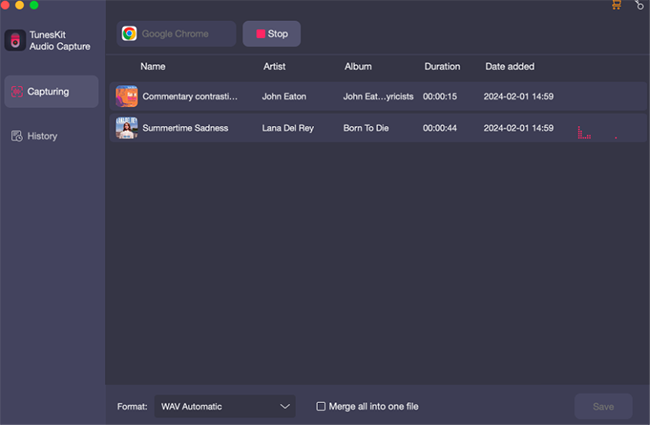
Now any browser from the starting window and it will open automatically. Then go to the Pandora music site and log into your own account.  Then play tracks you want to download in different tabs at the same time. TunesKit Audio Capture will divide them into separate tracks individually and download them.
Step 3. Edit downloaded tracks

edit audio
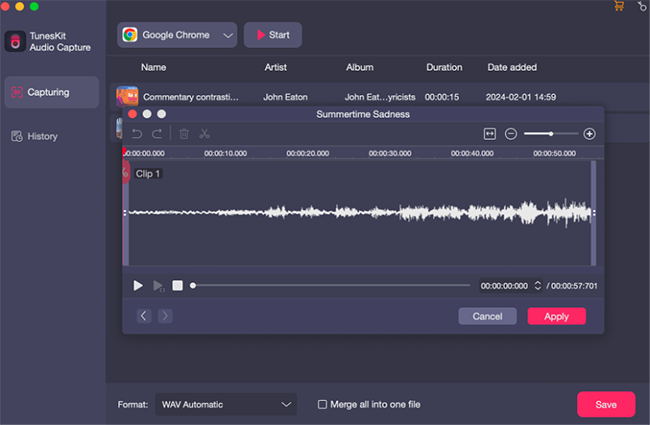
At the rear of each recorded track, you'll find the "edit" icon which will let you trim the recorded tracks flexibly. You can also edit the ID3 tags of the music in this window.
Step 4. Save and locate recorded Pandora radio

locate pandora music
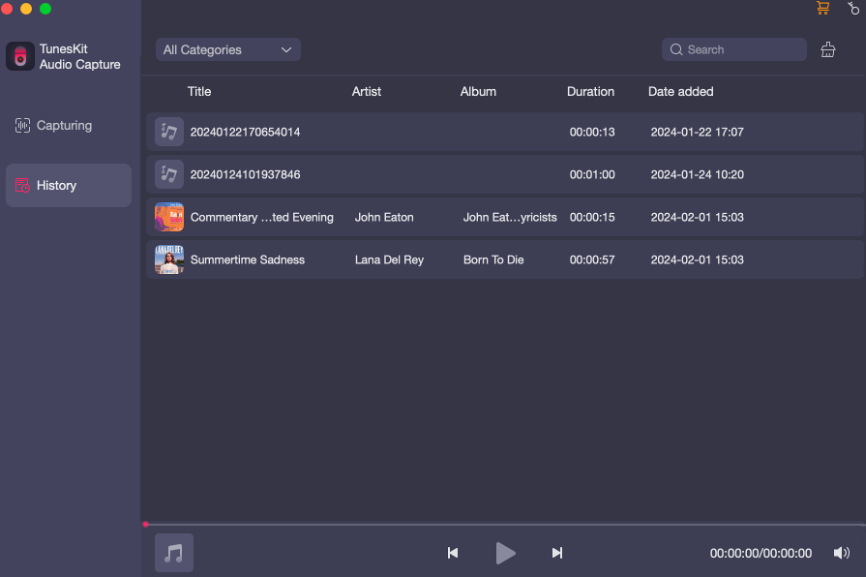
When you have finished downloading, simply quit the browser. Then the Cancel button will change to Save. Click it and all your recordings are saved instantly. After that, you can find all recorded tracks in the history folder. Then you can play each audio to preview the quality and delete the unwanted audios.
Method 2. Download Pandora Music with Chrome Extension

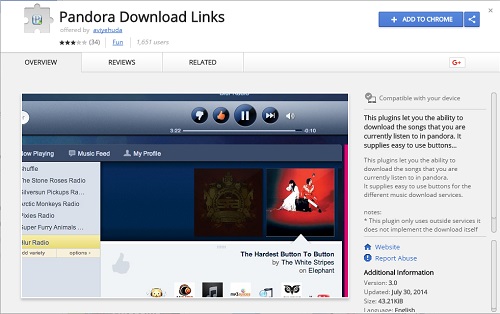
This solution only works for Chrome, because it provides Pandora extension in Chrome web store which will enable you to download what you are playing in Pandora. The best part is that it is completely free and free from malware and advertisements. You just need to install it in Chrome and you can begin to download Pandora playlist right away.

Step 1. Install Pandora Download Links extension


pandora download links
The extension's name is Pandora Download Links. Visit the store and search the extension, then add it to Chrome.
Step 2. Start to download Pandora music

download pandora radio
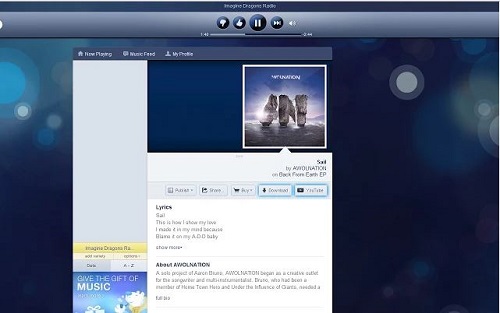
Go to the Pandora website, log into your account and begin to play any Pandora radio. Next to the song, you can see a download button. Click on it and save Pandora playlist on your computer. Then you can freely listen to the downloaded Pandora music offline.

Oct 25, 2019

Solutions to iPhone Keyboard Not Working

iphone keypad not working

Most Common Reasons for iPhone Keypad Not Working

• The app you are using the keyboard in crashes
• running out of RAM
• Hardware issues or unresponsive display and touch screen features.

Common Keyboard Issues and Their Fixes

1. Keyboard Lag

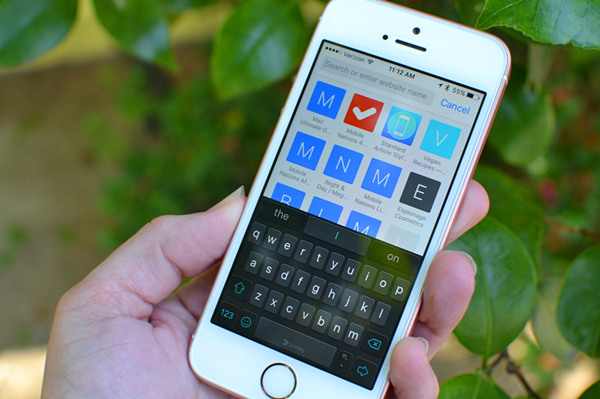
As the most common keyboard issue today, keyboard lag can be described as a situation where you are replying to a text message and the reaction of the keyboard cannot keep up with the typing speed.

Solution: Reset Keyboard Dictionary

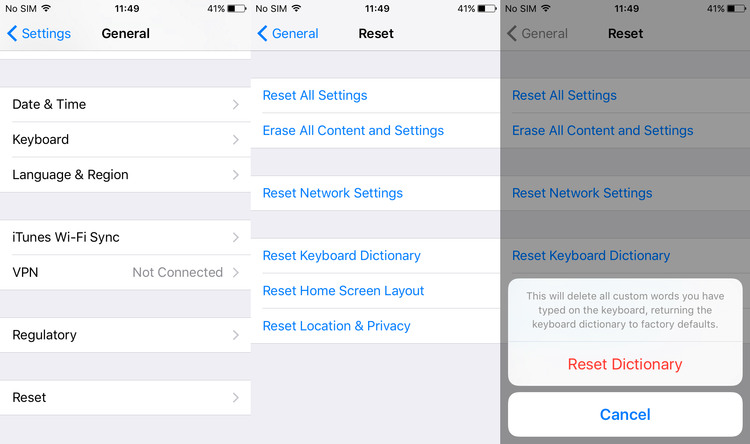
Step 1: Open the Settings menu;
Step 2: Scroll down and tap General, then tap on Reset;
Step 3: Scroll down and tap on the Reset Keyboard Dictionary button. Enter your password to confirm.
reset keyboard dictionary

2. Keyboard Freeze

This refers to the situation where the keyboard suddenly not responding to your taps, mainly due to the lack of RAM.

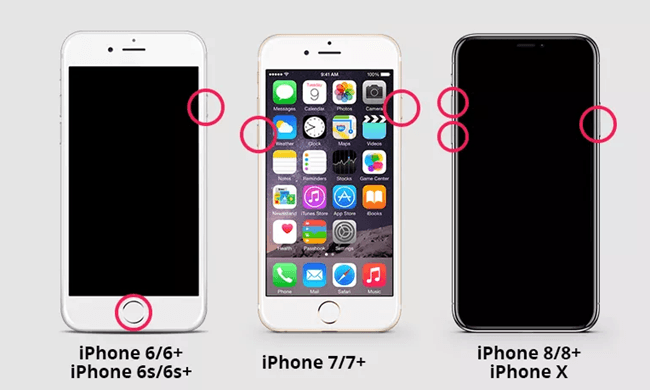
Solution: Force Restart iPhone (as illustrated in the image below)

For iPhone 6s and earlier models: simultaneously press the Home and the Power button.
For iPhone 7 and 7 Plus: hold the Power and the Volume Down simulteneously for about 10 seconds until the Apple logo appears on your screen.
For iPhone 8 and X series: press the Volume Up then the Volume Down and finally hold the Power button until the Apple logo appears.
how to force restart your iPhone

3. Keyboard Not Appearing

This happens while you are typing, you will find your screen turn black suddenly.

Solution 1: Try Other Keyboards

Third-party keyboards recommendations: Minuum, Gokeyboard, Flesky, GBOARD

Solution 2: Reboot Your iPhone

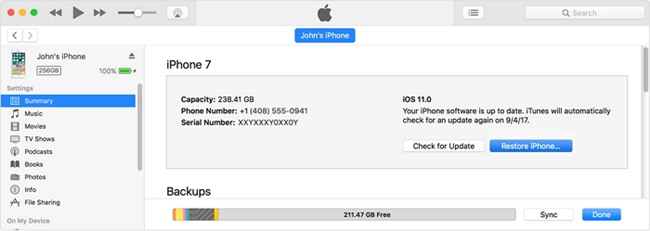
Solution 3: Restore iPhone with iTunes 

• Restoring using iTunes
Step 1: Connect your iPhone to the computer where you have stored your backup.
Step 2: Launch iTunes and go to Summary > Restore iPhone.
Step 3: Confirm the Restore option to start restoring.
restore from itunes

Fix iPhone Keyboard Not Working without Data Loss (Recommended)

It is important to note that you will lose all data on iPhone when restoring with iTunes. But there is a tool that can restore without data loss - TunesKit iOS System Recovery It will help you fix the iPhone keypad not working problem without necessarily having to lose your data.
  • Fix iOS problems with no risk of losing data.
  • Repair iPhone keyboard numbers not working problem as well as other 30+ types of iOS issues.
  • 2 smart repair modes are provided, Standard Mode and Advanced Mode to ensure a higher success rate
  • Applicable for common issues on almost all iPhone, iPad and iPod touch (iOS 12 included)
Steps of Using TunesKit iOS System Recovery:

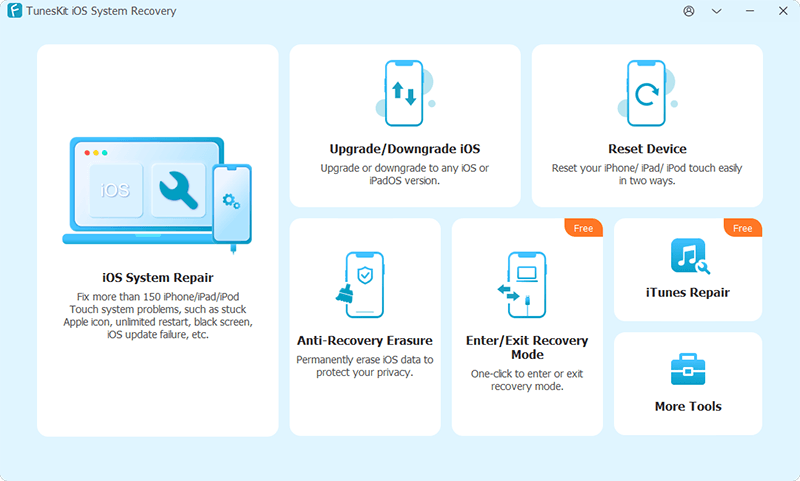
Step 1: Connect iPhone to PC
connect ios device
Launch TunesKit iOS System Recovery and connect your phone to the computer using a USB cable. Wait till the phone is detected, and you can usher your iPhone into the recovery mode with one click. Click Start and then choose "Standard Mode", then click 'Next'.
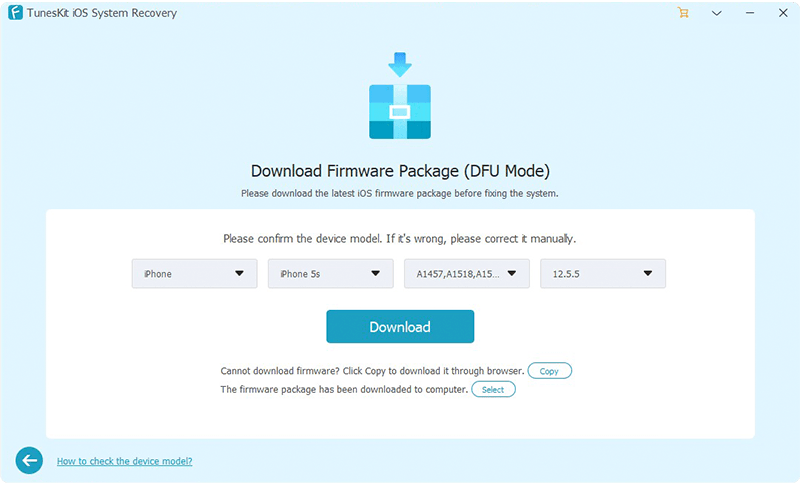
Step 2: Download firmware package
download firmware
Before downloading, ensure that the displayed devices info is correct. After that, begin downloading by clicking "Download".
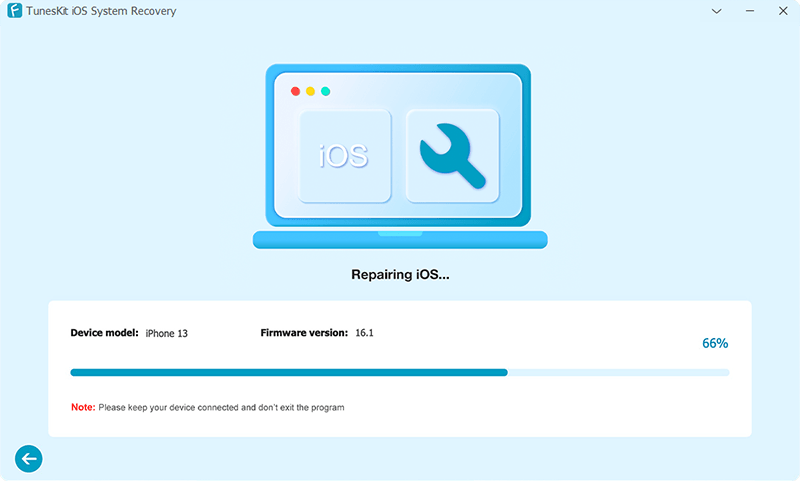
Step 3: Start fix iPhone keyboard not working
start recovering ios
After finish downloading, simply click on the "Repair" button to initiate the actual repairing process. A few minutes later, your iPhone keyboard should function normally again.

Conclusion

As long as you try the suggestions patiently listed above, your iPhone keyboard should back to normal again. We wish you the best iPhone-using experience.

Oct 24, 2019

TunesKit Launches Special Halloween Offer 2019: Free Software and More


Hong Kong, Oct. 24, 2019 - TunesKit Studio, a leading software provider, is here to give out free license for some of their products, in order to celebrate this spooky and thrilling festival with their customers. Besides, TunesKit also offers some huge discounts on other software. This Halloween promotion is time-limited and uses can only enjoy such an awesome offer from October 24 to November 06, 2019.

This Halloween offer consists of three main parts, including free giveaway for iOS System Recovery, buy one product and get one free license for another software, or directly buy TunesKit DRM removal tools at 20% OFF. Users can get what they want according to their own needs.


To be specific, all customers can get a free iOS System Recovery from TunesKit, a powerful iOS repair tool to fix almost all iOS or tvOS problems on iPhone, iPad, iPod touch and Apple TV, such as stuck on recovery mode, black screen of death, won’t turn on, etc. The only thing that users need to do is to share the page to their social platform like Facebook, Twitter or Pinterest. After that, users can get a free coupon code and then use this code to buy the product, and the price will be reduced to the Zero automatically.

In the second part of this promo, users can purchase one software they want and TunesKit will offer a free application as a gift, which means that they can get two products at a very lower price. That is to say, if users buy one iTunes M4V Converter, they can obtain a free license for Screen Recorder or Video Cutter; when they pay either one Audio Converter or Audible Converter, they can both get a free Audio Capture program to grab any sound on the computer.

At the end, TunesKit has make a 20% off discount on its hottest DRM removal tools, which include Spotify Music Converter, M4V Converter, Audio Converter, Audible AA/AAX Converter and Audio Capture. Customers can then easily bypass DRM from all kinds of protected media files, such as iTunes M4V movies, M4P songs and audibooks, Apple Music, Spotify tracks and audiobooks from Audible, etc. at a cheaper budget.

"To help customers enjoy this happy Halloween and also show our appreciation of their long-term support, we launched this Halloween giveaway and biggest offer," said Andres, TunesKit Global Marketing Director. "We hope our products can fully satisfy our customers and they can spend a cheerful Halloween night."

To get more details about this special Halloween sales, please visit its promo page here:

About TunesKit
TunesKit Studio is a world-leading software provider, offering professional multimedia software and iOS utilities for customers all over the world to enjoy media and device better. Their prpducts include media converter, video cutter, screen recorder, iPhone data recovery, iOS system recovery, etc. All the programs have received numerous satisfied users over 150 countries worldwide.

Oct 22, 2019

Should We Update iOS 13?


Some time has passed since the official issue of widely expected iOS 13. However, there are both positive comments and negative ones about the latest iOS, making those who have not updated the iOS hesitating: whether we should upgrade to iOS 13? To help the confused audience make the decision, we have collected a great deal of information and user reviews about using iOS 13, and as a result, provide you with the pros and cons of it.

Pros:

1. Dark Mode

dark-mode
For those users with the habit of fondling their iPhones (I suspect most users have this habit) before going to bed, this mode is a great improvement. No more white UI dazzle your eyes in the dark, and one more argument to persuade your mom that it's not so harmful playing with your cell phone in the dark.

2. Better Intelligence

This change mainly happens to the built-in apps, which has been critisized as "useless", "outdated" or "inconvenient". It seems that Apple has noticed the shortage of these apps and decide to optimize them. Among the changed list are Reminders (new categorization function and voice identification are added), Safari (new download manager is added),  Files (Files can be zipped or unzipped now).
reminder-app-update

3. Camera and Photo viewing

New features are added to cameras and photo viewing. Let's started with the camera.  The portrait mode is greatly optimized, as illumination function is added and strengthened.  As for photo viewing, the photo can now be sorted by different lengths of time, and irrelevant and duplicate images and videos can be hidden so that you can enjoy those beautiful memories freely. In addition, you can edit photos by adjusting 16 parameters.

Portrait-Lighthing-Control-iOS-13

4. Other Fixes Worth Noting

Better facial recognition (both the unlocking speed and the ability to recognize a face from different angles), bugs fixes (i.e. iPhone not ringing when receiving calls, failure of matching iPhone with Apple Watch), new Animoji and Memoji.
iphone-apps-stuck-on-waiting

Cons:

Though there are so many amazing new features in iOS 13, we shouldn't ignore that it comes with flaws. They are various compatibility issues. For example, it is reported that some apps stuck in the loading screen after updating iOS 13. They might seem minor, but when encountered in real usage, these problems become so annoying that you might strive to control yourself from hurling the phone.

Conclusion:

Although the drawbacks cannot be unseen, the advantages of iOS 13 still make this version of iOS worth updating. However, if you just can't tolerate issues like apps stuck or unable to use, it's OK to wait for further fixes of iOS 13.

Oct 12, 2019

How to Download Senorita by Shawn Mendes

senorita
If you have been paying attention to pop music, you must have noticed the hit Senorita by Shawn Mendes. As one of the Top 10 on Billboard, this catchy song is definitely going viral now, and it can be seen on various non-music platforms: YouTube, Twitter, Facebook and TikTok.
But to download this song on any website or app is not free, unless you read through this article, which introduces how to download this song for free.

Download Senorita with TunesKit Audio Capture

To download Senorita, you will need the help of a powerful tool - TunesKit Audio Capture. TunesKit Audio Capture will basically capture and download the Senorita audio played by YouTube. The reason we choose YouTube is that YouTube allows users to play high-quality videos free of charge.
Since the capturing will not result in any sound quality loss, to capture Senorita is equal to downloading this song in a sense. Besides, TunesKit Audio Capture allows you to save the recorded song in different forms. If you want to download other songs, this tool will also download it for you.

Steps to Use TunesKit Audio Capture

1. Launch TunesKit Audio Capture. It is recommended to open YouTube with Chrome. To add the browser you need, just drag and drop the browser to the list, or press the "+" icon and select the browser.select-source
2. Configure the output settings. In this menu, you can adjust the format, codec, channel or other parameters. The formats available include MP3, M4A, M4B, FLAC, WAV. If you are not familiar with these musical vernaculars, the preset drag-down menu allows you to simply select the audio with high quality or small size.
set-output
3. Launching YouTube in the TunesKit Audio Capture and play the Senorita YouTube video in the web browser. The recording will start on its own. After the downloading and recording is finished, click the Stop button.capture-audio
4. If you have seen advertisements the Senorita video you play, the advertisement segment is probably captured in the offline audio too. You can tap the Edit icon at the rear of each track to open the editing menu, where you can cut the unwanted segments. Finally click the Save button and you will find the Senorita offline audio in the folder you set.
cut-audio

Conclusion

This method you just saw can be used to download not only Senorita, but also any songs that can be streamed on the Internet. However, if you don't have any problem subscribing to those music services, then downloading Senorita by Shawn Mendes from official links is also a good choice.

Free Download Maroon 5 ‘Memories’ to MP3


Hear Maroon 5 Get Nostalgic on New Single ‘Memories’

The single ‘Memories’, a new single from Maroon 5, was released on Tuesday (Oct. 8). The reflective, sentimental track looks back on good times past with someone who’s no longer here. “Memories” serves as the band’s first new release since their chart-topping hit “Girls Like You”, which spent seven weeks at No. 1 on the Billboard Hot 100 in the fall of 2018.

The song received hourly plays on its first day from various websites, including the video for their new single. The video is dedicated to Jordan Feldstein, the band’s late manager who died unexpectedly on December 2017 following a pulmonary embolism. The front-man Adam Levine delivers the song’ nostalgic lyrics in the video.

“Here’s to the ones that we got/ Cheers to the wish you were here, but you’re not/ Cause the drinks bring back all the memories of everything we’ve been through/ Toast to ones here today/ Toast to the ones here today/ Toast to the ones that we lost on the way.”

Tool You’ll Need to Free Download Maroon 5 ‘Memories’ on Spotify

Only premium account holders could access to the offline playback on Spotify, while the service is not open to all free subscribers. TunesKit Spotify Music Converter could let you enjoy Spotify music when you don’t have a network connection. What’s more, it could provide some special services only for premium users and additional services outside Spotify.

TunesKit Spotify Music Converter Key Features
Download and convert Spotify music to common audio formats
Preserve the original audio quality and full ID3 tags information
Support the offline playback of Spotify music on various devices
Listen to Spotify music without the distraction of advertisements

Tutorial: Follow the Following Steps to Download Maroon 5 Songs as MP3 on Spotify

Just follow the three-step to get the free mp3 file of ‘Memories’ on Spotify.

Step 1. Add ‘Memories’ to TunesKit Spotify Music Converter

Download and install TunesKit Spotify Music Converter on your computer at first. Then fire up TunesKit Spotify Music Converter and it will load the Spotify program automatically. Then search the lead single ‘Memories’ on Spotify and directly copy and paste the link of the single to the main home of TunesKit.

Step 2. Configure Output Audio Format and Music Preference

When the new song ‘Memories’ is successfully imported from Spotify into TunesKit Spotify Music Converter, you can simply click the menu bar and select the audio preference. There is a collection of popular audio formats for you to choose from, including MP3, FLAC, AAC, M4A, WAV, and M4B. Besides, you can adjust the audio channel, bit rate, sample rate, and others.

Step 3. Start to Free Download and Convert Spotify Songs to MP3

When all the settings are customized, you can begin to download and convert the new song ‘Memories’ to MP3 or other formats by clicking the ‘Convert’ button at the bottom right. After conversion, you could find the MP3 file of ‘Memories’ on your computer by navigating to the history folder. Then you could transfer it to your media playing device for offline listening.

Music streaming has become a hot market and Spotify is one of the leading names in that market. So, if you are a user of other streaming music platforms, you still could get help from TunesKit DRM Audio Converter and TunesKit Audio Capture. Apple Music subscribers can install DRM Audio Converter for converting your purchased songs to common formats and sharing the converted songs with your family and friends. People who are listening to music on other music services like Pandora use Audio Capture to record the track as MP3 from other programs or Chrome.


WATCH: Free Download Maroon 5 'Memories' to MP3

Oct 10, 2019

Free Download Justin Bieber ‘10,000 Hours’ to MP3


Justin Bieber Sprinting to Billboard County Chart Title with ‘10,000 Hours’

Pop Superstar Justin Bieber join forces for a duet with an American Country Duo Dan + Shay, ‘10,000 Hours’, making his appearance on a Billboard country chart. Released Oct. 4, the song received hourly plays on its first day from various websites. On the airplay-, streaming- and sales-based Hot Country Songs chart, the ranking of “10,000 Hours” keeps a continuous growing. 

This romantic new song just days after Bieber’s wedding is full of love to their other half, and the lyrics certainly tell a romantic story, with the singers promising to love the subject of the song for “10,000 hours or the rest of my life.” From the music video, you can deeply feel the love between each other, and the music video marks the first time Justin Bieber and Hailey Baldwin have starred in a project together.

“10,000 Hours” is undoubtedly a romantic symbol in the personality of Justin Bieber’s music. If you haven’t listened to “10,000 Hours’ on Spotify yet, give it a spin. In the following part, we will show you how to achieve Justin Bieber songs free download MP3, so that you could enjoy this romantic song offline in the car or on the move or listen to it on the go with other more portable devices.


Tool You’ll Need to Free Download Justin Bieber’s ‘10,000 Hours’ on Spotify

Only premium account holders could access to the offline playback on Spotify, while the service is not open to all free subscribers. TunesKit Spotify Music Converter could let you enjoy Spotify music when you don’t have a network connection. What’s more, it could provide some special services only for premium users and additional services outside Spotify.


TunesKit Spotify Music Converter Key Features
  • Download and convert Spotify music to common audio formats
  • Preserve the original audio quality and full ID3 tags information
  • Support the offline playback of Spotify music on various devices
  • Listen to Spotify music without the distraction of advertisements

Tutorial: Follow the Following Steps to Download Justin Bieber Songs as MP3 on Spotify

Just follow the three-step to get the free mp3 file of ‘10,000 Hours’ on Spotify.

Step 1. Drag ‘10,000 Hours’ to TunesKit Spotify Music Converter


Download and install TunesKit Spotify Music Converter on your computer at first. Then fire up TunesKit Spotify Music Converter and it will load the Spotify program automatically. Then search the lead single ‘10,000 Hours’ on Spotify and directly drag the single to the main home of TunesKit.

Step 2. Configure Output Audio Format and Music Preference


When the new song ‘10,000 Hours’ is successfully imported from Spotify into TunesKit Spotify Music Converter, you can simply click the menu bar and select the audio preference. There is a collection of popular audio formats for you to choose from, including MP3, FLAC, AAC, M4A, WAV, and M4B. Besides, you can adjust the audio channel, bit rate, sample rate, and others.

Step 3. Start to Free Download and Convert Spotify Songs to MP3


When all the settings are customized, you can begin to download and convert the new song ‘10,000 Hours’ to MP3 or other formats by clicking the ‘Convert’ button at the bottom right. After conversion, you could find the MP3 file of ‘10,000 Hours’ on your computer by navigating to the history folder. Then you could transfer it to your media playing device for offline listening.

Music streaming has become a hot market and Spotify is one of the leading names in that market. So, if you are a user of other streaming music platforms, you still could get help from TunesKit DRM Audio Converter and TunesKit Audio Capture. Apple Music subscribers can install DRM Audio Converter for converting your purchased songs to common formats and sharing the converted songs with your family and friends. People who are listening to music on other music services like Pandora use Audio Capture to record the track as MP3 from other programs or Chrome.

WATCH: Enjoy '10,000 Hours' Music Video on the Music Streaming Services


Sep 30, 2019

5 Best Alternatives to iMyFone Fixppo

Posted by Brian Davis on September 30, 2019 6:22 PM

If you are an Apple fan, then you should know that occasionally the iOS system malfunctions. This may occur many forms including a white screen, a blue screen, or an iTunes error. All these annoying problems can be easily solved by iOS repair tools, among which iMyFone Fixppo is one of the best. Powerful, as it is, iMyfone has its own limitations, and here you will see 5 top iMyFone Fixppo alternatives that you probably would consider switching to.

1. TunesKit iOS System Recovery

joyoshare-ultfix-ios-system-recovery
TunesKit iOS System Recovery comes with a free trial where you can conveniently enter and exit recovery mode. Compatible with most iDevices, it can repair numerous iOS problems. It is a reliable iOS recovery tool that can fix issues without endangering your precious data. In addition to high efficiency, this tool is easy to use, taking you only 3 steps to repair the iOS system.
The major downside with this program is that it is not free, but so are most iOS repair programs in the market.
Down TunesKit iOS System Recovery here

2. Tenorshare Reiboot

tenorshare-reiboot
This is an all-round iOS management tool. The program stands out due to its access to up to 5 devices for life. It is also able to easily and quickly fix iOS-related issues.It is also relatively easy to use even when you have no technical skills.
The only flaw is that the program, according to users’ feedback, crashes sometimes when in use. This program is also not free. If you want to resolve other issues other entering and exiting recovery mode, you have to pay for the premium.

3. Dr.Fone - Repair

drfone-repair
This program is used to fix phones that will not start or reboot. Many people like it because it offers a safe method to repair an iPhone since it is specifically designed with such devices in mind.
Just like most premium recovery programs, the Dr.Fone - Repair program comes at a price. It also can not offer much help in case of a jailbroken iPhone.

4. FonePaw iOS System Recovery

fonepaw-ios-system-recovery
FonePaw iOS System Recovery is another great iMyFone Fixppo alternative that you should try. In addition to the simple usage, it is an intelligent program that can resolve almost all your iPhone issues, but with a number of clicks.
The main shortcoming of FonePaw iOS System recovery software is that it does not support the latest iOS yet. But an update may show up any time soon.

5. Joyoshare UltFix iOS System Recovery

joyoshare-ultfix
This is an awesome iPhone iOS repair tool that is compatible with iOS 13. It can repair more than 30 iOS problems such as iPhone keeps turning off. In addition, it has a free recovery mode which makes it easy to use.
With very limited shortcomings, this is one of the most popular iOS system recovery software in the market. The only major shortcoming is that the trial version has very limited features which makes it impossible for potential users to test the program before buying it.

Conclusion

All these 5 alternatives mentioned above are amazing tools, each of which has its own strengths and drawbacks. Which one to use still depends on you.

Sep 20, 2019

How to Fix iPhone X Keeps Restarting

Boasting of an astonishing OLED screen without the home button, iPhone X distinguishes itself from its predecessors. Nevertheless, it is still not immune to various iPhone issues, for example, iPhone X keeps restarting (also known as boot loop). We’ve mapped out in the subsequent context the reason why iPhone X stucks in a boot loop and some solutions to it


1. Why iPhone X Bump into Boot Loop?

Unsuccessful Update: An unsuccessful update can easily result in a boot loop
Malfunctioning Hardware: malfunctioning hardware needs to get repaired or replaced as soon as possible, or boot loop is a possible outcome.
Jailbroken iPhone: Jailbreaking will make iPhone X more vulnerable to malware or virus attack, which can lead to a boot loop as well.

2. How to Fix iPhone X Keeps Restarting?

Here are 3 universal ways for you to troubleshoot the boot loop regardless of the cause.

2.1 Force Reboot

If your iPhone X stuck in a boot loop, the first and the easiest solution you should try is to force reboot it. Guide of force rebooting iPhone X is listed below:

1) Fast press and release the volume up button.
2) Fast press and release the volume down button.
3) Hold the side button until the screen shuts off and then turns back on. Release the side button when the Apple logo appears. After that, your iPhone X will restart automatically.

2.2 Restore iPhone X with iTunes


1) Connect your iPhone X to the computer and launch iTunes.
2) A window will pop up not long after iTunes completes detecting the problem of your iPhone X. Just hit the Restore button to get rid of the iPhone X reboot loop.

3) In case the pop-up window doesn’t show up, you can click on the Summary button and then the Restore iPhone button to restore your iPhone X.


2.3 Powerful Tool to Fix Boot Loop Without Data Loss

Convenient as it is, iTunes restore will result in data loss. Therefore, we have another option for you— TunesKit iOS System Recovery. This program focuses on rescuing your iPhone from various problems including iPhone X boot loop. Most importantly, it is able to repair iPhone without data loss.
TunesKit iOS System Trial Free Download
Guide for using TunesKit iOS System Recovery

Step 1. Download and launch the program and click the Start button to move forward.

Step 2. In the next window, choose the Standard Mode and press the Next button on the right bottom.

Step 3. Download the firm package matched to your iPhone X. Once the correct package is downloaded, begin to fix iPhone X boot loop.

3. Bottomline

We sincerely hope that these 3 suggestions are helpful to you.

Sep 18, 2019

TunesKit Screen Recorder Officially Launched to Record Screen

TunesKit Studio, a professional multimedia software provider, has recently released a new member named TunesKit Screen Recorder to its multimedia product lines, aiming to help users grab any video and audio activity on the desktop of PC or Mac computer with ease.
tuneskit screen recorder
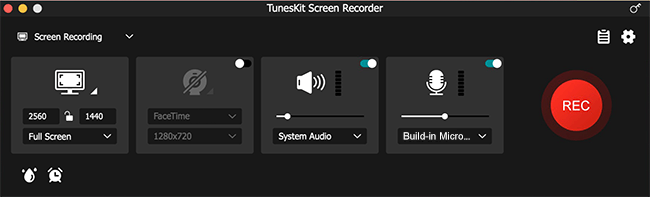
To be specific, users can use it to record video tutorials, online lectures, Skype conversations, webinars, streaming music, computer games, and many other videos or sounds playing within a program with almost 100% original quality preserved. This easy recording program can not only record video, but also capture sound from either system audio or microphone or both simultaneously. After that, users can also edit the recording to make it look better.
Besides, users are allowed to customize the recording options according to their needs. For instance, schedule the recording while staying away, set the keyboard shortcuts, add special effects to cursors and clicks and change the output folder, etc. Moreover, the application supports plenty of output media formats and devices, including MP4, M4V, AVI, MOV, WMV, MP3, FLAC, iPhones, Android phones, smart TVs, game consoles, etc., so users can save the recordings as any format or export to any device freely.
"We plan to offer users a quick easy solution to record videos and audios on computer, and here comes this software," said Andres, the R&D director of TunesKit. "The biggest distinction of our program is that it can capture your screen in a quite simple way due to its clear interface and neat button design, compared with those complicated similar products in the market," added he.

Key Features of TunesKit Screen Recorder for Windows and Mac

  • Grab various videos and audios through web browser, media player, or program, etc. on desktop with high quality retained
  • Capture video/audio with system sound and microphone simultaneously or individually
  • Support plenty of output media formats and portable devices
  • Trim the recordings and edit the ID3 tags
  • Make scheduled recordings and customize other parameters
  • Easy to operate with friendly user interface

Price and Availability


TunesKit Screen Recorder offers a trial version for users to use the program for free, but the recordings will be added with watermarks. To unlock the limit, users need to upgrade it to the full version, ranging from $29.95 for a single license, $59.95 for 2-5 PCs to $79.95 for unlimited use. All the packages are provided with free lifelong software update and tech support. As for the availability, it works well on all Windows and Mac platforms, including the latest Win 10 and macOS 10.13 High Sierra and 10.14 Mojave.

Source: https://www.tuneskit.com/releases/tuneskit-screen-recorder-newly-released.html

You may also like: